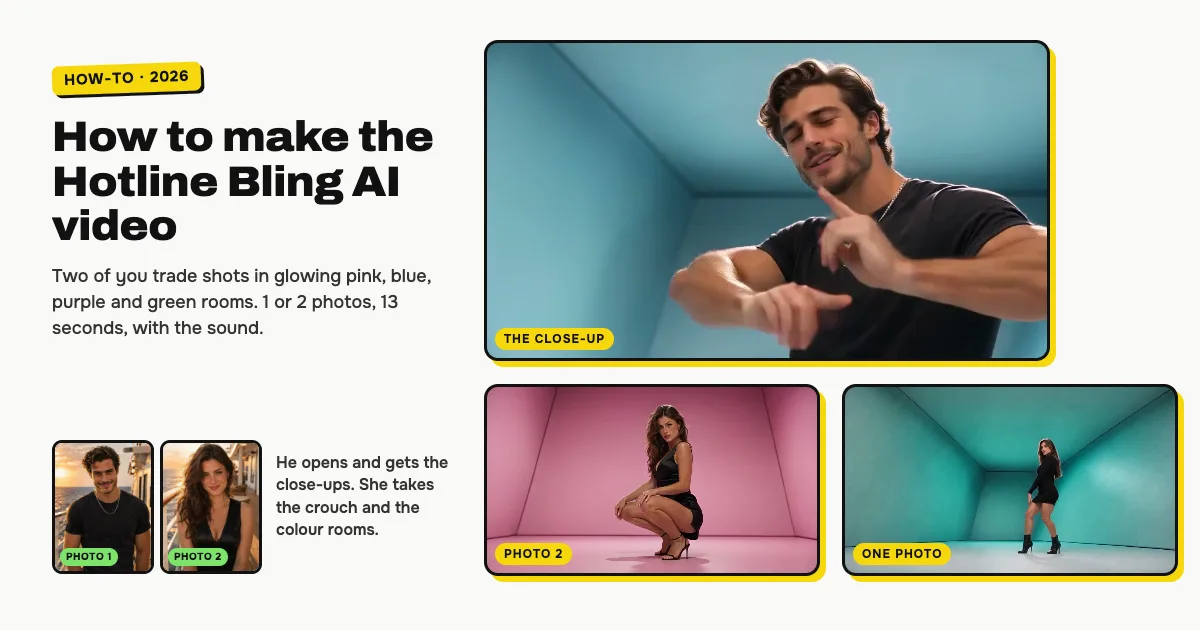
Open the Hotline Bling AI template on ClipRemake, add your photo in box 1 and, if you like, your partner's in box 2, then press Remake this. About five minutes later you download a 13-second landscape MP4: you open small in a bright pink room and take two big close-ups with the phone-to-the-ear hand, while your partner crouches in pink, leans in a purple room and sways in a green one. The trend sound is on it and there is no watermark. One video costs $9.99 with one photo or two, and there is no free version.
Where the Hotline Bling AI trend comes from
In October 2015 Drake's "Hotline Bling" video put one man in a row of empty rooms, each lit in a single solid colour, doing a loose, slightly awkward dance. The dance became a meme within days.
In November 2026 it came back as AI video. An AI template rebuilt the coloured rooms as a seven-shot clip for two dancers who take turns, one per shot. On November 5 a TikTok creator put SpongeBob and Patrick in it; Anubis and Thoth and the Avatar couple followed on the same cuts. Sites then offered the clip with your own photos, and couples and best friends started posting themselves trading shots.
ClipRemake rebuilds that clip with the people in your photos. No character, no singer and no frame of the music video is used in your video.
Who can be in it
| Photo | Who they play | Their shots |
|---|---|---|
| 1 (needed) | The first dancer | The wide pink room, both close-ups, the white room |
| 2 (optional) | The second dancer | The crouch in pink, the purple room, the green room |
Leave box 2 empty and the person from photo 1 dances every shot. Adults only, one person per photo, and people only for now.
How to make the Hotline Bling AI video, step by step
Step 1: Add your photo
On the Hotline Bling AI template, tap box 1 and pick a photo of yourself.
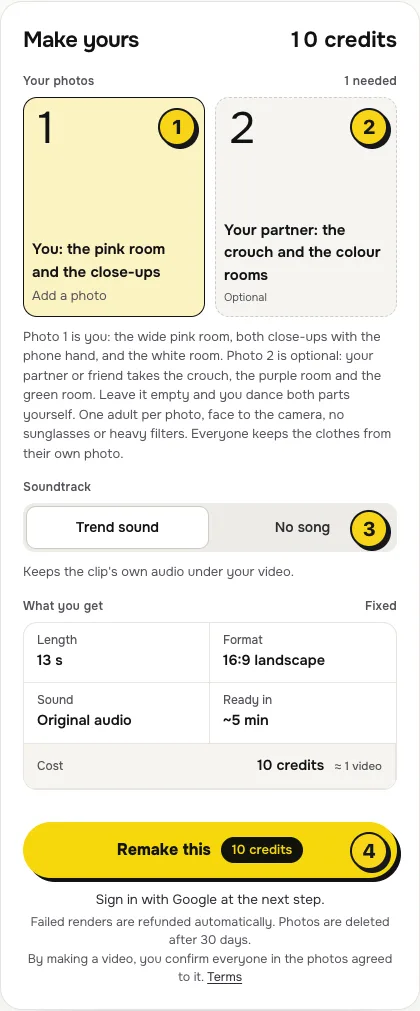
- Face to the camera, sharp and well lit, no sunglasses or heavy filters. Photo 1 gets two close-ups that fill the screen.
- Waist up is fine; full body is better for the wide shots.
- One person per photo.
Step 2: Add your partner, or skip it
Box 2 is for the second dancer: a partner, a best friend, a sibling. They get three shots of their own. Skipping it costs nothing; you simply dance both parts.
Step 3: Choose the sound
The switch (3) has two settings:
| Setting | What you get | When to pick it |
|---|---|---|
| Trend sound (default) | The 13 seconds of audio the trend posts use | You want to post it as it is |
| No song | A silent MP4 | You will add the sound in TikTok or Reels yourself |
Step 4: Press Remake this
Press Remake this (4). If you are not signed in, you sign in with Google first. With no credits yet, you choose a pack: one video is $9.99 (100 credits), and bigger packs and plans cost less per video. Pay by card, Apple Pay or Google Pay. If a render fails, the credits come back on their own.
Step 5: Download and post
About five minutes later the video is in My videos. Download the MP4 (13 seconds, 16:9, 480p, no watermark) and switch on the AI-generated label when you post. On a phone a landscape clip plays across the middle of the screen, the same way the trend posts do.
What your video looks like, shot by shot
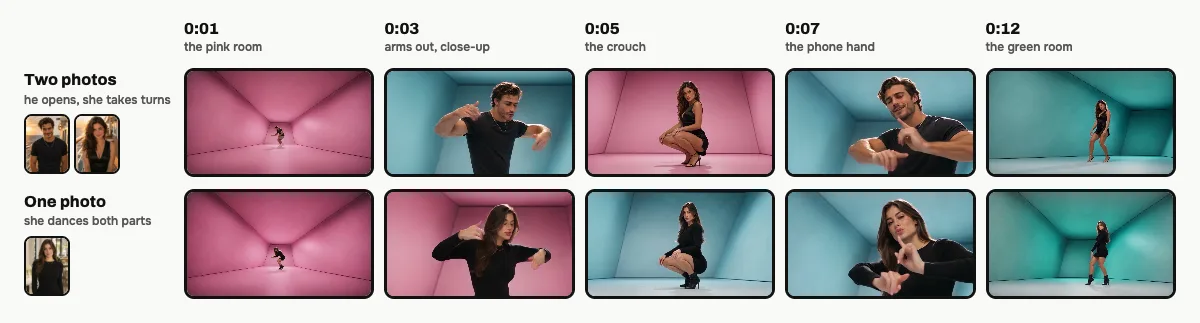
Two of our examples, one from two photos and one from a single photo:
| Time | Who | What happens |
|---|---|---|
| 0:00–0:02 | Photo 1 | Small at the far wall of a pink room, a loose, bouncy dance |
| 0:02–0:04 | Photo 1 | Low close-up in an icy-blue room, arms swinging wide |
| 0:04–0:06 | Photo 2 | Crouched low on the heels in pink, looking at the camera |
| 0:06–0:08 | Photo 1 | Close-up again: a hand to the ear like a phone, the other waving |
| 0:08–0:09 | Photo 2 | Leaning by the wall of a purple room, swaying |
| 0:09–0:11 | Photo 1 | A wide white room, stepping side to side |
| 0:11–0:13 | Photo 2 | Swaying and turning in a green room |
Small moments can differ between renders, and the room colours can shift a little.
Caption ideas
There is no text in the video, so the caption is yours:
- "when they finally text back"
- "us after one (1) phone call"
- "duet with my favourite person"
- "I took both parts, nobody else was answering"
Is it free?
No. Every video is a real render that costs money to make, so there is no free version, free trial or watermarked preview. One video costs $9.99 with one photo or two, the pricing page lists packs and plans that cost less per video, and failed renders are refunded in credits automatically. Unused packs bought by mistake can be refunded under the refund policy.