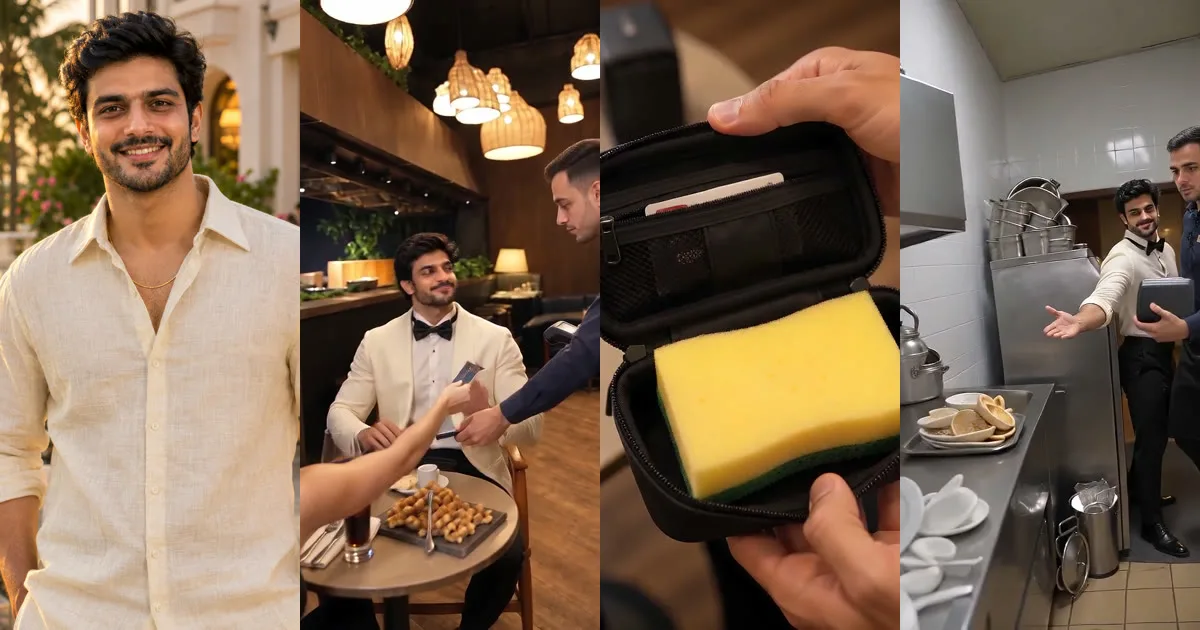
Open the Never Let Her Pay AI template on ClipRemake, add a photo of yourself in box 1 and, if you like, a friend in box 2 to play the waiter, then press Remake this. About five minutes later you download an 11-second vertical MP4: your date reaches for the bill, you stop her with one calm hand, unzip a little black pouch and hold up a kitchen sponge, and the waiter steers you back to the kitchen, where the dirty plates are waiting. The clip's sound is on it and there is no watermark. One video costs $9.99 with one photo or two, and there is no free version.
What is the Never Let Her Pay trend?
It is a short AI comedy skit about the "I got this" move at dinner. On November 8, 2026 the TikTok creator @s.nemz posted an AI clip, labelled as AI by TikTok, in which he plays a man in a cream dinner jacket who refuses to let his date pay. He opens his pouch with total confidence and pulls out nothing but a yellow-and-green kitchen sponge. Six quick cuts later he is in the restaurant kitchen next to a pile of dishes. Remakes with other faces started the next day; one of them passed 17 million views within a week.
People post it to roast the friend who always says he will pay, to tease a partner before a dinner out, or simply as themselves with the caption "POV: you never let her pay".
Who can be in it
| Photo | Who they play | Their moments |
|---|---|---|
| 1 (needed) | The guest who says "I got this" | The open palm, the pouch, the sponge, the proud face, the walk to the kitchen |
| 2 (optional) | The waiter | Holds the card machine, stares at the sponge, walks the guest off and points at the dishes |
Leave box 2 empty and the AI makes up the waiter. The date is never cast: only her arm and hair are in the shot, as in the original. Adults only, one person per photo, and people only for now.
How to make the Never Let Her Pay AI video, step by step
Step 1: Add your photo
On the Never Let Her Pay AI template, tap box 1 and pick a photo of whoever plays the guest.
- Face to the camera, sharp and well lit, no sunglasses or heavy filters. Your face is on screen at the table and in a close-up.
- A selfie or a chest-up photo is enough. You sit for most of the clip, and the guest is usually dressed up in a cream tuxedo jacket with a black bow tie.
- Anyone can be the guest: a man or a woman.
Step 2: Add the waiter, or skip it
Box 2 takes a friend as the waiter: they get the card machine, the long stare at the sponge and the walk to the kitchen. Skipping it costs nothing.
Step 3: Choose the sound
| Setting | What you get | When to pick it |
|---|---|---|
| Trend sound (default) | The original clip's own 11 seconds of audio | You want to post it as it is |
| No song | A silent MP4 | You will add the sound in TikTok or Reels yourself |
Step 4: Press Remake this
Press Remake this. If you are not signed in, you sign in with Google first. With no credits yet, you choose a pack: one video is $9.99 (100 credits), and bigger packs and plans cost less per video. Pay by card, Apple Pay or Google Pay. If a render fails, the credits come back on their own.
Step 5: Download and post
About five minutes later the video is in My videos. Download the MP4 (11 seconds, 9:16, 480p, no watermark) and switch on the AI-generated label when you post.
What your video looks like, shot by shot
Two of our one-photo examples, a man on top and a woman below:
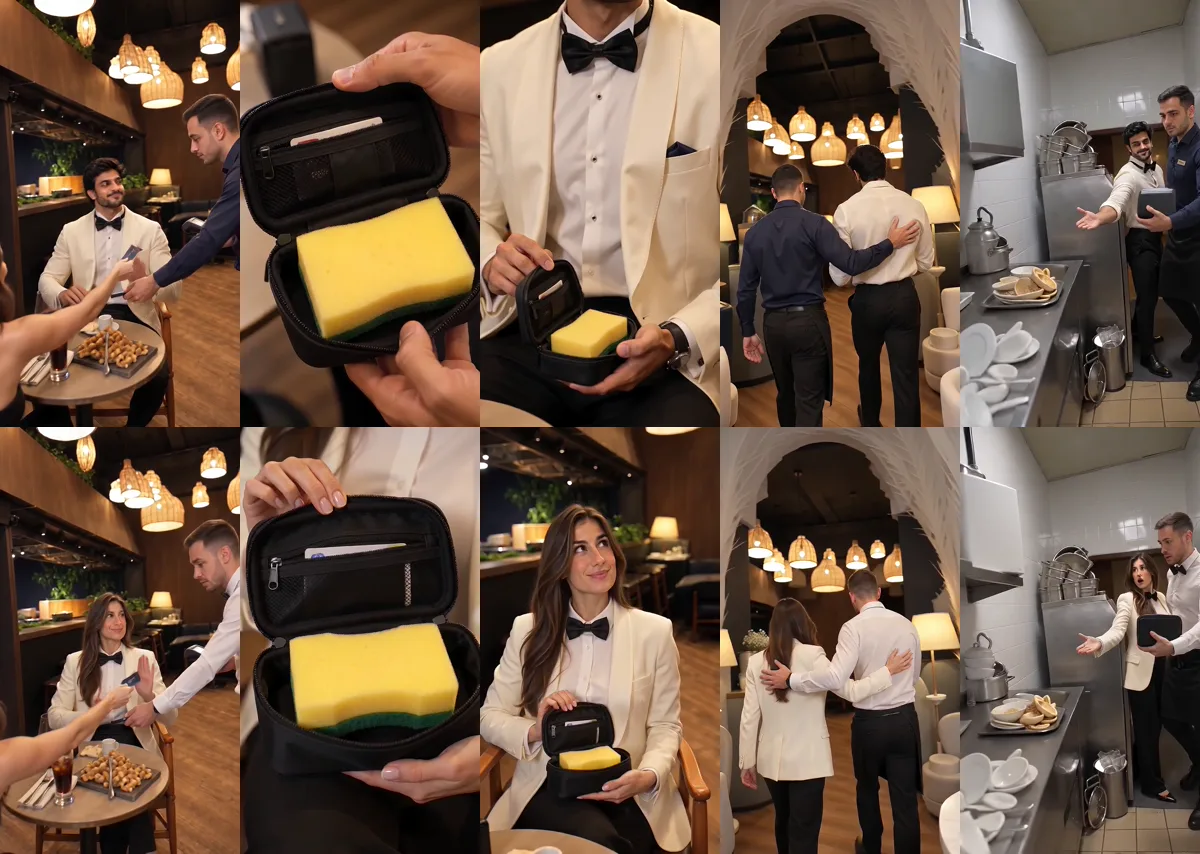
| Time | What happens |
|---|---|
| 0:00–0:03 | At the round table the date holds out her card; you push it back with an open palm and lift a small black pouch |
| 0:03–0:05 | Close-up of the pouch unzipping: a kitchen sponge where the money should be |
| 0:05–0:06 | You on your chair with the pouch on your lap, looking up at the waiter, very pleased with yourself |
| 0:06–0:08 | The waiter beside the table with the card machine, staring at the sponge |
| 0:08–0:09 | Seen from behind, the waiter walks you off with an arm round your back |
| 0:09–0:11 | The back kitchen: the waiter points you at a counter piled with dirty plates |
Small details can change between renders, such as the pouch's shape or what the waiter wears.
Caption ideas
The video has no text on it, so the caption is yours:
- "POV: you never let her pay"
- "I got this 😏"
- "tag the friend who always says he'll pay"
- "date night budget"
Is it free?
No. Every video is a real render that costs money to make, so there is no free version, free trial or watermarked preview. One video costs $9.99, the pricing page lists packs and plans that cost less per video, and failed renders are refunded in credits automatically. Unused packs bought by mistake can be refunded under the refund policy.