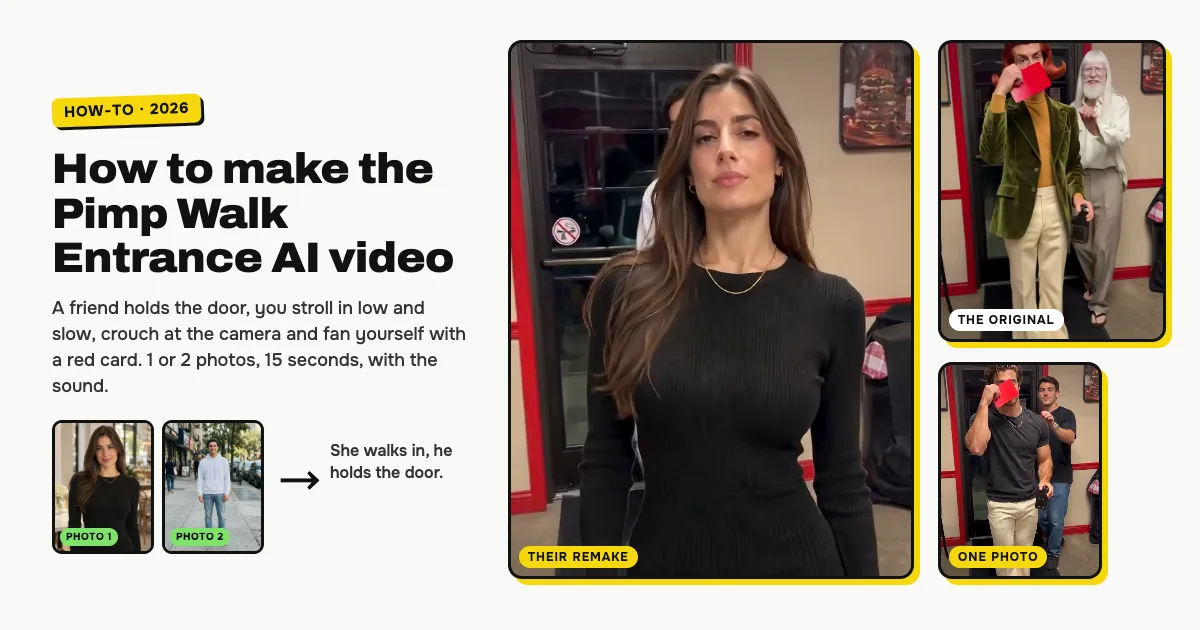
Open the Pimp Walk Entrance AI template on ClipRemake, add a photo of yourself in box 1 and, if you want, a friend in box 2, then press Remake this. About five minutes later you download a 15-second vertical MP4: your friend holds a burger-shop door and grooves while you stroll in leaning way back, sink lower with every step, crouch right at the camera, then stand up and fan yourself with a red card. The trend sound is on it and there is no watermark. One video costs $9.99 with one photo or two, and there is no free version.
What is the Pimp Walk Entrance trend?
Pimp Walk Entrance is the TikTok trend also posted as "hold the door" and the pimpwalk trend. The move is old: a 2018 clip of a man strutting into a barbershop while a friend dances by the door. In October 2026 it came back as AI video. On October 25 @mrmiltonfrost posted the version everyone copies: a small burger shop at night, a white-haired friend on the door, and a walker in a velvet jacket with a red card. A CapCut template followed at the end of October, and since then people put themselves and their friends into the same 15 seconds.
The joke is the swagger. Someone holds the door for you, and you take the slowest, lowest, most unbothered walk possible.
Who can be in it
| Photo | Who they play | Their moments |
|---|---|---|
| 1 (needed) | The walker | Through the door, the low strut, the crouch at the lens, the red-card fan |
| 2 (optional) | The friend on the door | Holds the door, dances beside it, steps up behind you at the end |
Leave box 2 empty and the AI fills the door with someone it makes up. Adults only, one person per photo, and people only for now.
How to make the Pimp Walk Entrance AI video, step by step
Step 1: Add the walker
On the Pimp Walk Entrance AI template, tap box 1 and pick the photo of whoever should make the entrance.
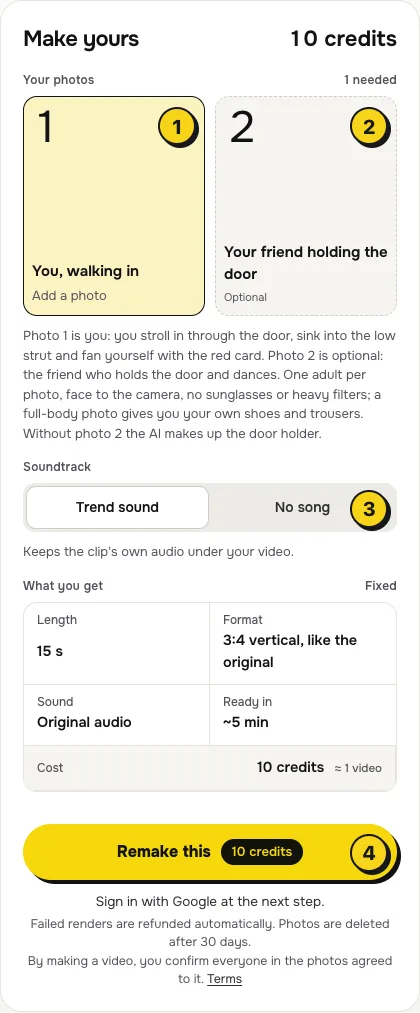
- Full body is best. The walker is seen head to toe, so a photo that shows your shoes and trousers keeps them in the video.
- Face to the camera, sharp and well lit, no sunglasses or heavy filters.
- One person per photo.
Step 2: Add the door holder, or skip it
Box 2 is for the friend who holds the door. Their face is clearest at the end, when they lean in behind you, so pick someone who will want to be in it. Skipping it costs nothing: the AI invents a door holder.
Step 3: Choose the sound
The switch (3) has two settings:
| Setting | What you get | When to pick it |
|---|---|---|
| Trend sound (default) | The 15 seconds of audio the original reel uses | You want to post it as it is |
| No song | A silent MP4 | You will add the sound in TikTok or Reels yourself |
Step 4: Press Remake this
Press Remake this (4). If you are not signed in, you sign in with Google first. With no credits yet, you choose a pack: one video is $9.99 (100 credits), and bigger packs and plans cost less per video. Pay by card, Apple Pay or Google Pay. If a render fails, the credits come back on their own.
Step 5: Download and post
About five minutes later the video is in My videos. Download the MP4 (15 seconds, 3:4 vertical, 480p, no watermark) and switch on the AI-generated label when you post.
What your video looks like, beat by beat
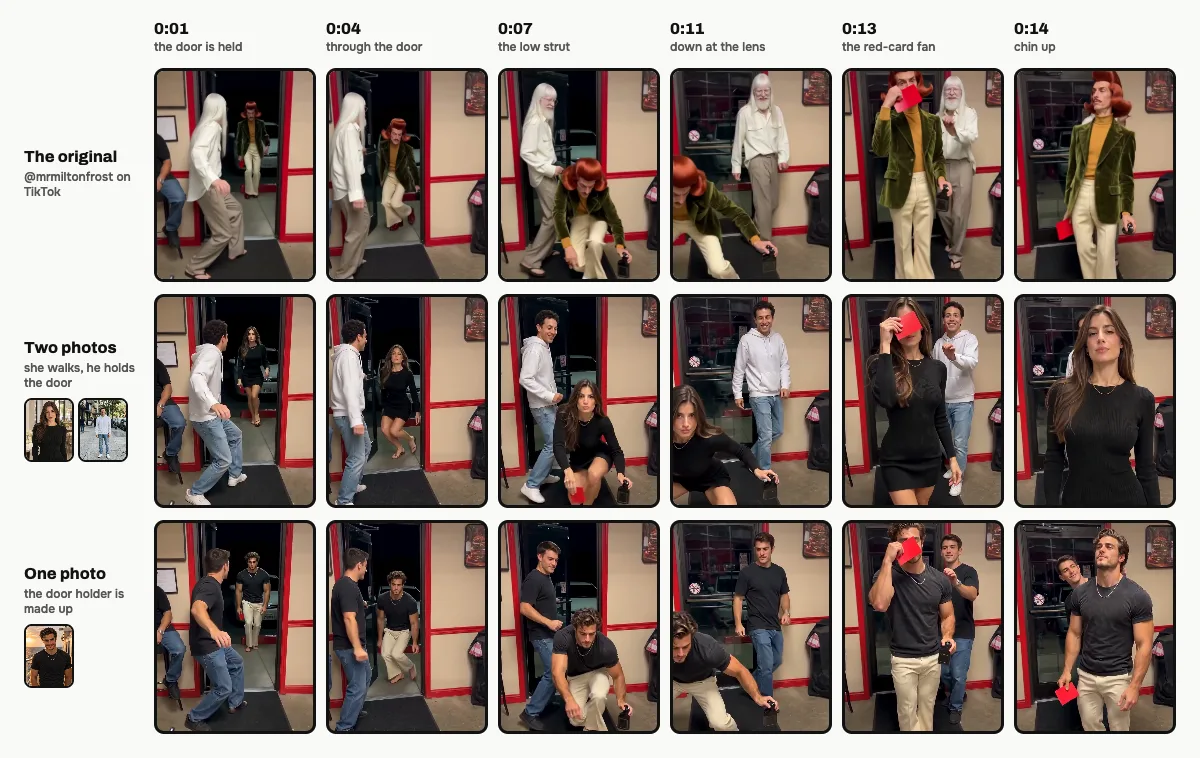
Two of our examples next to the original, one made from two photos and one from a single photo:
| Time | What happens |
|---|---|
| 0:00–0:02 | Your friend grooves by the open door while you come up outside |
| 0:02–0:05 | You step through, knees bent, leaning far back, red card in hand |
| 0:05–0:10 | The strut: slow, rolling, lower with every step |
| 0:10–0:12 | You crouch almost to the floor right at the camera |
| 0:12–0:13 | Back on your feet, you wave the red card under your chin |
| 0:13–0:15 | You stand tall, chin up, your friend at your shoulder |
Small moments can differ between renders.
Caption ideas
There is no text in the video, so the caption is yours:
- "POV: you hold the door for me"
- "how I walk into the group chat after being right"
- "first day back at the office"
- "when the DJ plays my song"
Is it free?
No. Every video is a real render that costs money to make, so there is no free version, free trial or watermarked preview. One video costs $9.99 with one photo or two, the pricing page lists packs and plans that cost less per video, and failed renders are refunded in credits automatically. Unused packs bought by mistake can be refunded under the refund policy.