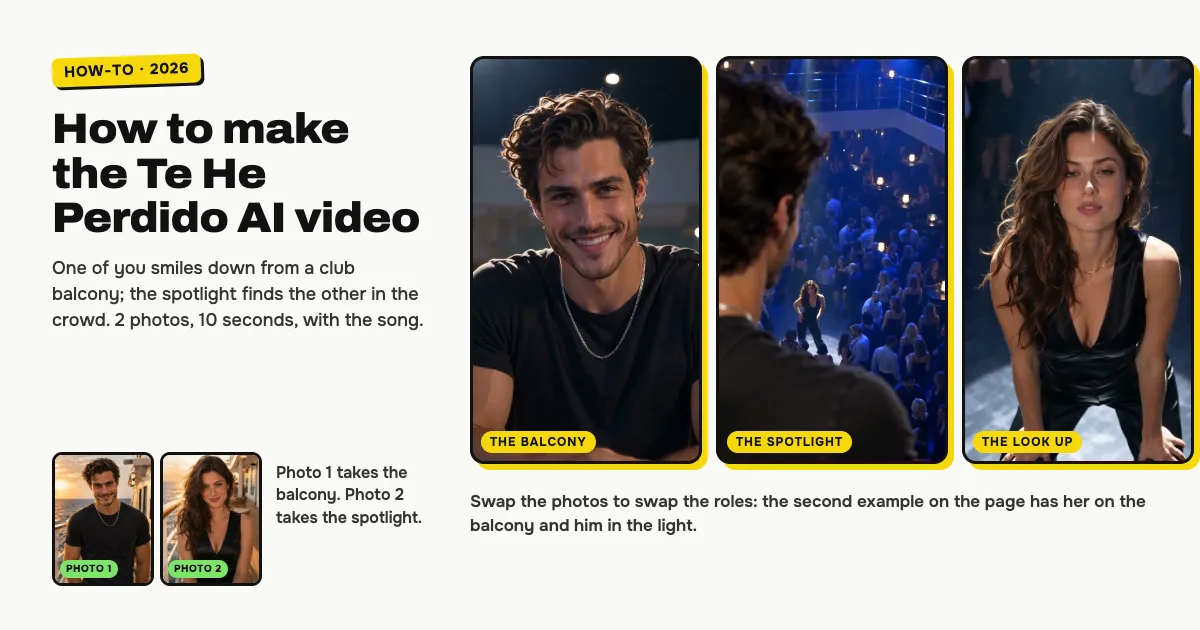
Open the Te He Perdido AI template on ClipRemake, put the person for the balcony in box 1 and the person for the spotlight in box 2, then press Remake this. About five minutes later you download a 10-second vertical MP4: photo 1 rests on the rail of a club balcony and grins at the camera, the view then drops past their shoulder to a crowded floor washed in blue, where a white spotlight picks out photo 2, who looks straight up at the camera. The song from the trend is on it and there is no watermark. One video costs $9.99, and there is no free version.
Where the Te He Perdido AI trend comes from
The moment is older than the trend. In the 2010 Spanish romance Tres metros sobre el cielo, he stands on a balcony above a crowded club and finds her dancing below. The song most people pair with it is Dorian's "La tormenta de arena" from 2009, and the trend took its name from that song's most quoted line.
On September 28, 2026 a CapCut template turned the scene into a short AI clip with two made-up people: a smile from the balcony, the look down at the crowd, the spotlight, the look back up. Spanish-language how-to posts picked it up in early October, and the hashtag filled with couples, friends and even pets in the same three shots. It is also called the La Tormenta de Arena trend.
ClipRemake rebuilds that clip with the two people in your photos. Nobody from the film or the template is used in your video.
Who goes where
| Photo | Who they play | Their shots |
|---|---|---|
| 1 (needed) | The one on the balcony | Leaning on the rail, the smile and the push-in, then seen from behind looking down |
| 2 (needed) | The one in the spotlight | Small in the crowd under the white light, then the final close-up looking up |
Want it the other way round? Swap the photos. Adults only, one person per photo, people only for now.
How to make the Te He Perdido AI video, step by step
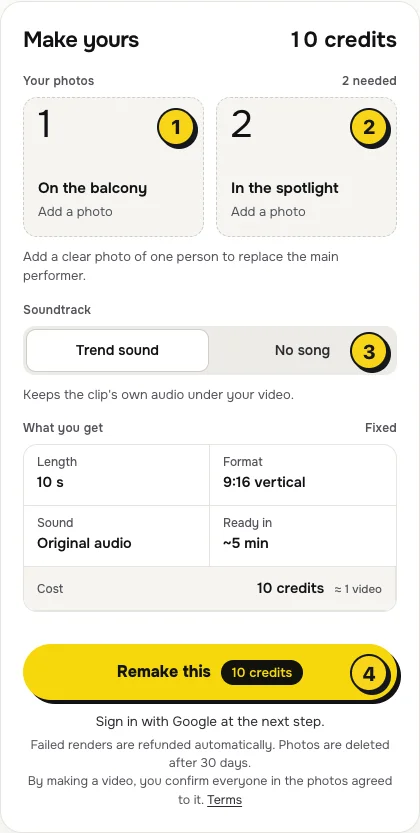
Step 1: Add photo 1, the balcony
On the Te He Perdido AI template, tap box 1 and pick the photo of the person who looks down from the balcony.
- Face to the camera, sharp and well lit, no sunglasses or heavy filters. The balcony shot ends in a close-up of the smile.
- One person per photo.
Step 2: Add photo 2, the spotlight
Box 2 is the person the light finds. Their last shot is a close-up from above, so a chest-up photo with the face large gives the best likeness; a tiny face in a full-body photo is harder for the AI to keep.
Step 3: Choose the sound
The switch (3) has two settings:
| Setting | What you get | When to pick it |
|---|---|---|
| Trend sound (default) | The 10 seconds of "La tormenta de arena" the template uses | You want to post it as it is |
| No song | A silent MP4 | You will add the sound in TikTok or Reels yourself |
Step 4: Press Remake this
Press Remake this (4). If you are not signed in, you sign in with Google first. With no credits yet, you choose a pack: one video is $9.99 (100 credits), and bigger packs and plans cost less per video. Pay by card, Apple Pay or Google Pay. If a render fails, the credits come back on their own.
Step 5: Download and post
About five minutes later the video is in My videos. Download the MP4 (10 seconds, 9:16, 720p, no watermark) and switch on the AI-generated label when you post.
What your video looks like, shot by shot
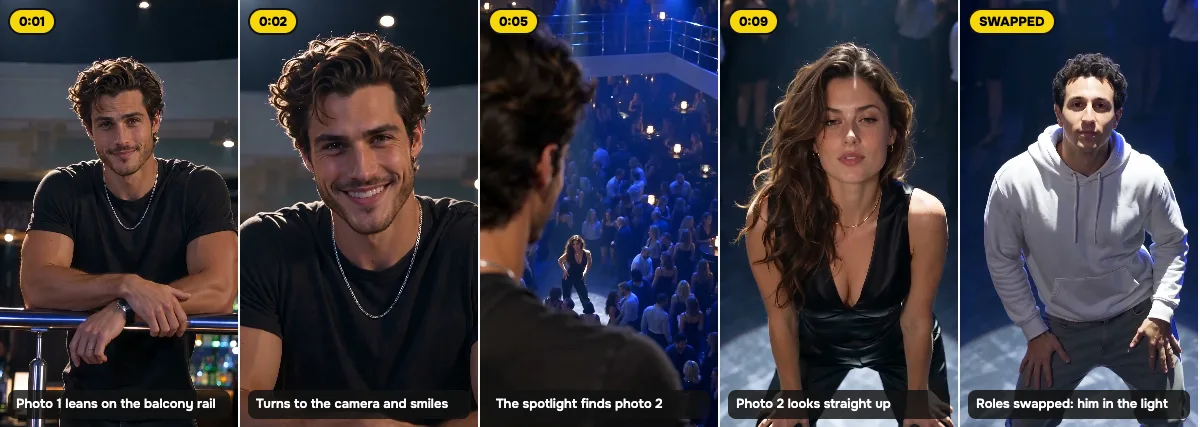
Two of our examples, the same scene with the roles swapped:
| Time | Who | What happens |
|---|---|---|
| 0:00–0:03 | Photo 1 | Leans on the balcony rail, glances away, then turns to the camera with a smile as it moves in close |
| 0:03–0:06 | Photo 1, then photo 2 | Over photo 1's shoulder the camera drifts down to the crowd; a white spotlight shows photo 2, small on the dance floor |
| 0:06–0:10 | Photo 2 | Close-up from above in the spotlight: hands on the knees, looking straight up with a cool stare |
Small moments can differ between renders, and the cut to the crowd can land a little earlier or later.
Caption ideas
There is no text in the video, so the caption is yours:
- "found you in the crowd"
- "out of everyone in the room"
- "te encontré"
- "lost my best friend at the club again"
Is it free?
No. Every video is a real render that costs money to make, so there is no free version, free trial or watermarked preview. One video costs $9.99, the pricing page lists packs and plans that cost less per video, and failed renders are refunded in credits automatically. Unused packs bought by mistake can be refunded under the refund policy.