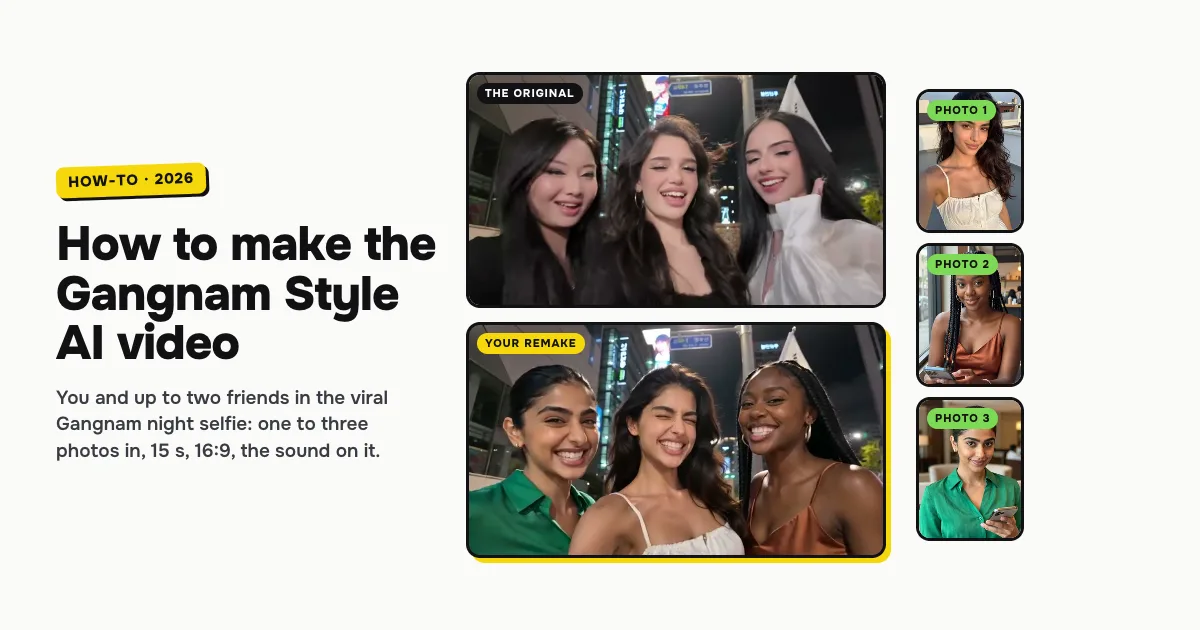
Short answer: to make the Gangnam Style AI video, open the Gangnam Style AI template on ClipRemake, add your photo as photo 1 (and up to two friends if you like) and press Remake this. You and your friends take the three places in the viral night selfie on a Gangnam street: the three of you in one frame, then a solo of the chorus each as the phone whips from face to face. Only your photo is required; an empty spot gets a friend the AI makes up. About five minutes later you download a 15-second, 16:9 MP4 with the clip's own sound and no watermark. One video costs $9.99, and there is no free version.
What is the Gangnam Style AI trend?
On October 5, 2026 TikTok creator @emiliyyam posted "gangnam style in gangnam": three friends squeezed into one phone selfie on a street in Gangnam, Seoul, at night, office towers and Korean flags behind them, singing along to the chorus of PSY's 2012 hit. The phone whips from one friend to the next for a solo each, a pout, a hair flip, hands in the hair, and comes back to the friend holding it.
From October 12 people began making AI versions of that exact selfie: their own friend groups, coworkers, actors and movie characters in the three places, the street, the camera and the order of the solos kept. That is why people search for it as Gangnam Style AI, the Gangnam Style trend and the three people Gangnam Style trend.
It is not the horse dance from the 2012 music video. Nobody rides an invisible horse here: the whole joke is three friends giving a chorus everything, into a phone, on an ordinary street.
Who can be in it: one, two or three photos
| Photos | Who is in the video | Who the AI makes up |
|---|---|---|
| 1 | You, in the middle, holding the phone: the first and the last solo | The friends on the right and on the left |
| 2 | You in the middle and one friend, on the right or on the left | The third friend |
| 3 | You in the middle, your friends on the right and on the left | Nobody |
All three cost the same: one video, 10 credits.
How to make the Gangnam Style AI video, step by step
Step 1: Add your photo
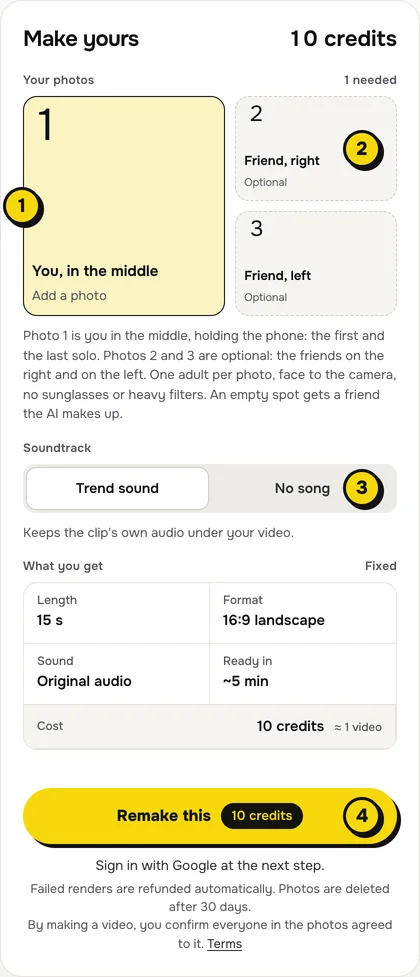
Open the Gangnam Style AI page. Tap the big box, You, in the middle (1 in the picture), and choose a clear, front-facing photo of yourself. This person holds the phone and gets the first and the last solo.
Step 2: Add your friends (optional)
The two smaller boxes (2) are the friends on the right and on the left. Add one, both or neither. Use only photos of adults who agreed to be in the video, one person per photo, face to the camera.
Step 3: Choose the sound
The switch (3) has two settings:
| Setting | What you get | When to pick it |
|---|---|---|
| Trend sound (default) | Your video with the clip's own 15 seconds of audio: the chorus and the friends singing along | You want it ready to post, beat for beat with the original |
| No song | A silent video | You will add the sound inside TikTok or Reels, the safer way if an app mutes reused audio |
Step 4: Press Remake this
Press Remake this (4). If you are not signed in, you sign in with Google first. If you have no credits yet, you pick a pack: one video is $9.99, and bigger packs and plans cost less per video. Pay by card, Apple Pay or Google Pay. If a render fails, the credits come back on their own.
Step 5: Download and post
About five minutes later the video is in My videos. Download the MP4: it is 15 seconds, landscape 16:9 like the original, with no watermark. Switch on the AI-generated label when you post, and tag the two friends.
What your video looks like, shot by shot
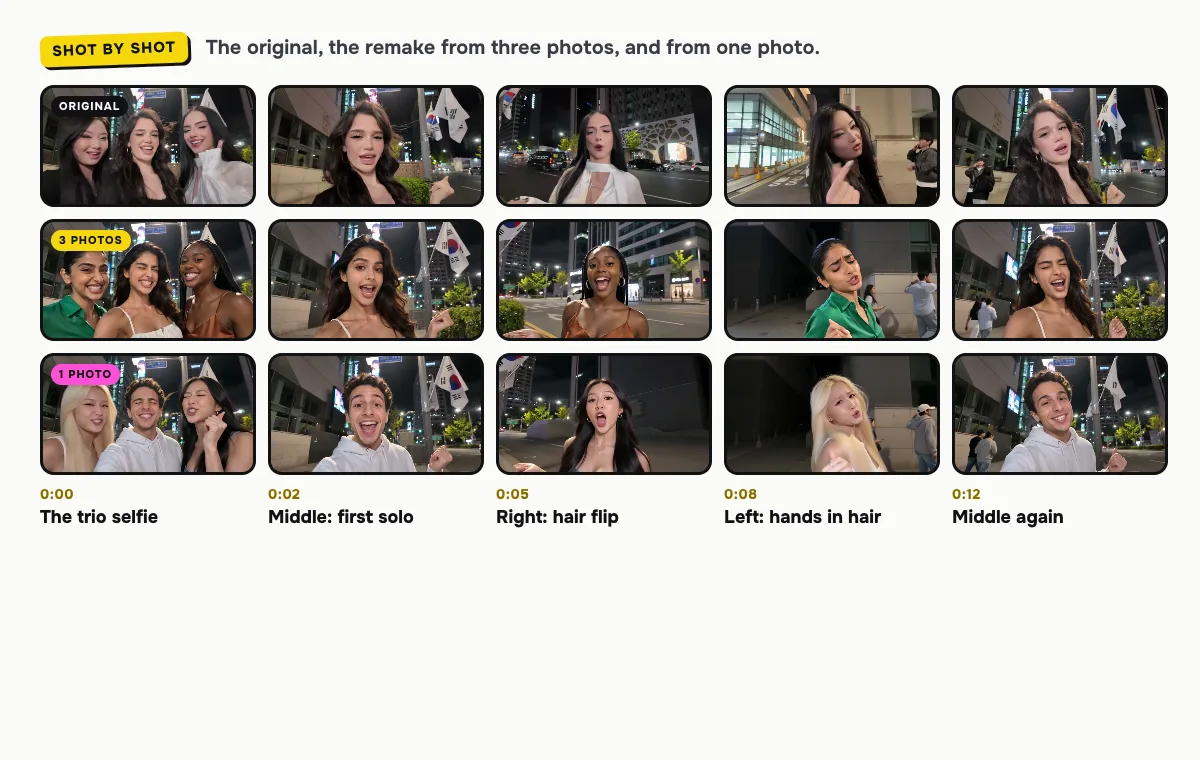
The street, the selfie camera, the whip pans and the order of the solos come from the original. Only the faces change:
| Time | Who is on camera | What happens |
|---|---|---|
| 0:00–0:02 | All three | The trio selfie, everyone singing the chorus |
| 0:02–0:05 | Photo 1, in the middle | The first solo, straight into the lens |
| 0:05–0:08 | The friend on the right | A solo with a hair flip |
| 0:08–0:12 | The friend on the left | A solo with both hands in the hair, strangers walking past far behind |
| 0:12–0:15 | Photo 1 again | Back to the middle for the last solo |
The original runs a few seconds longer and ends on the three of them laughing under the flags; the remake is the first 15 seconds, the part with every solo in it.
How to add the Gangnam Style sound on TikTok or Reels
- You kept Trend sound: the audio is already in the file. Post it as it is.
- You picked No song: in TikTok, tap Add sound, search for "Gangnam Style" and pick the chorus most posts use, starting it with the trio frame. Reels works the same way with Audio.
Tips for a better result
- One person per photo. A group photo confuses who goes where; give each friend their own photo.
- Faces to the camera. Front-facing photos in even light hold up best in the close-up solos under street lights.
- Put the boldest friend in the middle. Photo 1 opens and closes the video and holds the phone.
Is it free?
No. Every video is a real render that costs money to make, so there is no free version, free trial or watermarked preview. One video costs $9.99 with one, two or three photos, the pricing page lists packs and plans that cost less per video, and failed renders are refunded in credits automatically. Unused packs bought by mistake can be refunded under the refund policy.