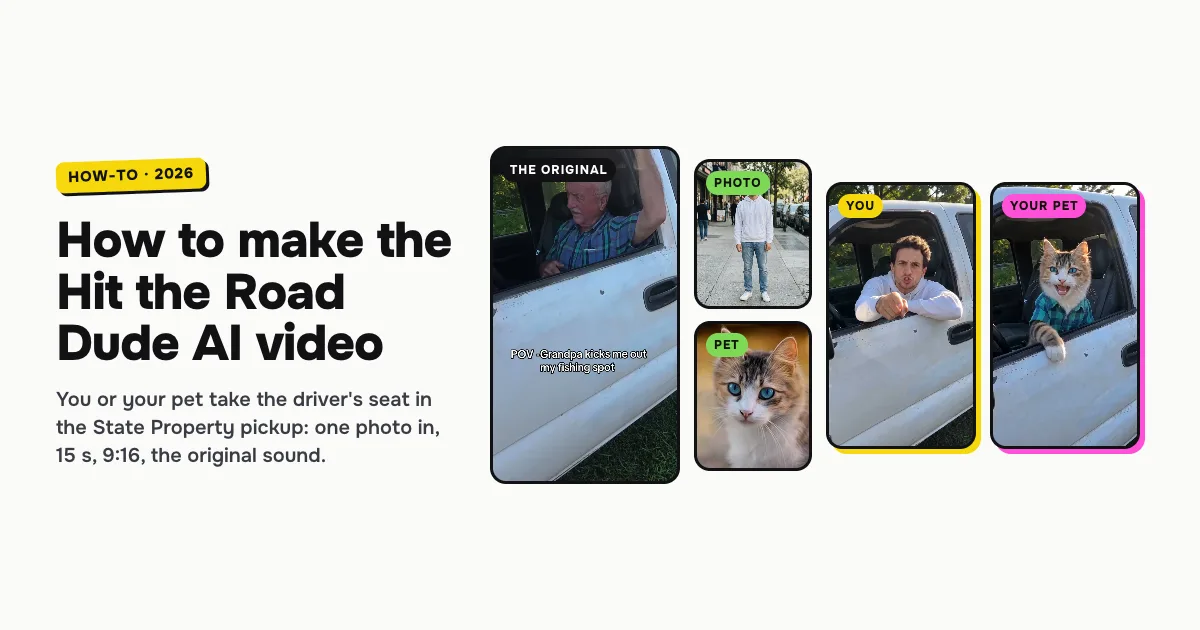
Short answer: to make the Hit the Road Dude AI video, open the Hit the Road Dude AI template on ClipRemake, pick You or Your pet, add one clear photo and press Remake this. Whoever is in the photo takes the driver's seat of the white pickup in the State Property clip: "who told you you could fish here?", "State? This? State?", "hit the road, dude" and "it's private property", with the squint, the point and the wave-off. Pets wear a plaid shirt and scold with real furry paws. About five minutes later you download a 15-second, 9:16 MP4 with the original sound and no watermark. One video costs $9.99, and there is no free version.
What is the Hit the Road Dude AI trend?
Hit the Road Dude is a real phone clip. On August 21, 2025 a TikTok fisherman posted the moment an older man in a white pickup pulled up to the pond he was fishing and threw him out. "Who told you you could fish here?" "I thought it was state property." "State? This? State?… Hit the road, dude. This ain't no state property, it's private property." The lines turned into a meme of their own, known as the State Property meme, the Private Property meme and Lock 'Em Up, after a line that comes later in the clip.
In October 2026 the clip came back as an AI trend: people put themselves, their friends, cartoon characters and, above all, cats and dogs in plaid shirts in the driver's seat, keeping the pickup, the window and every line. That is why people search for it as Hit the Road Dude AI, the State Property meme AI and the Hit the Road Dude cat.
The joke is the disbelief: "State?" said three times, as if the idea were an insult, then the wave-off. So the version you want keeps the pickup, the lines and the timing, and only changes who is behind the wheel.
Who can be in it: you or your pet
| Pick | Photo | What happens |
|---|---|---|
| You | One adult, face clearly visible, waist-up or full length | You take the driver's seat behind the open window, in the top from your photo, on every line |
| Your pet | One cat or dog, face and fur in view; a close-up works | It sits upright in the driver's seat in a plaid shirt and scolds with its front paws, never human hands |
Both cost the same, last the same 15 seconds and use the same pickup.
How to make the Hit the Road Dude AI video, step by step
Step 1: Pick who drives
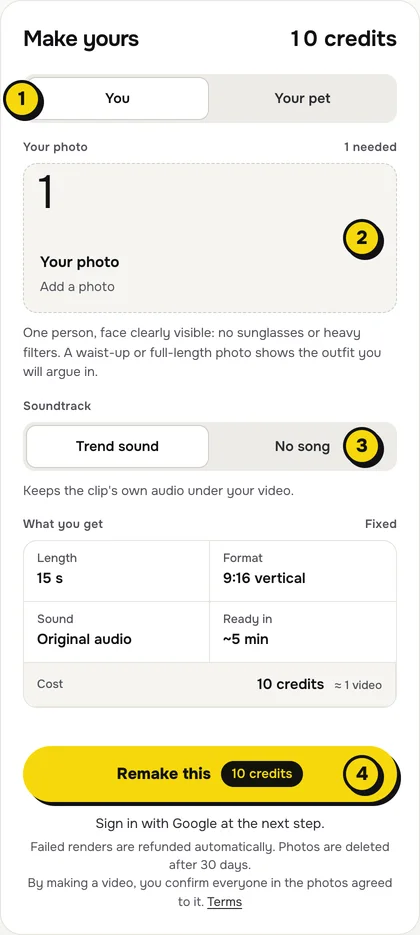
Open the Hit the Road Dude AI page. At the top of the maker, choose You or Your pet (1 in the picture).
Step 2: Add one photo
Tap the photo box (2) and choose your photo:
- You: one person, face clearly visible, no sunglasses or heavy filters. Only the top half of you shows behind the truck door, so a waist-up photo is enough, and the top you wear in it is the top you scold in.
- Your pet: a sharp photo of one cat or dog with its face, eyes and markings clear. It sits behind the door, so the whole animal does not need to be in the photo.
Step 3: Choose the sound
The switch (3) has two settings:
| Setting | What you get | When to pick it |
|---|---|---|
| Trend sound (default) | Your video with the clip's own 15 seconds of audio, the lines in the driver's own voice | You want it ready to post, line for line with the original |
| No song | A silent video | You will add the sound inside TikTok or Reels, the safer way if an app mutes reused audio |
Step 4: Press Remake this
Press Remake this (4). If you are not signed in, you sign in with Google first. If you have no credits yet, you pick a pack: one video is $9.99, and bigger packs and plans cost less per video. Pay by card, Apple Pay or Google Pay. If a render fails, the credits come back on their own.
Step 5: Download and post
About five minutes later the video is in My videos. Download the MP4: it is 15 seconds, 9:16, with no watermark. Switch on the AI-generated label when you post, and tag the friend who always picks the fishing spot.
What your video looks like, line by line
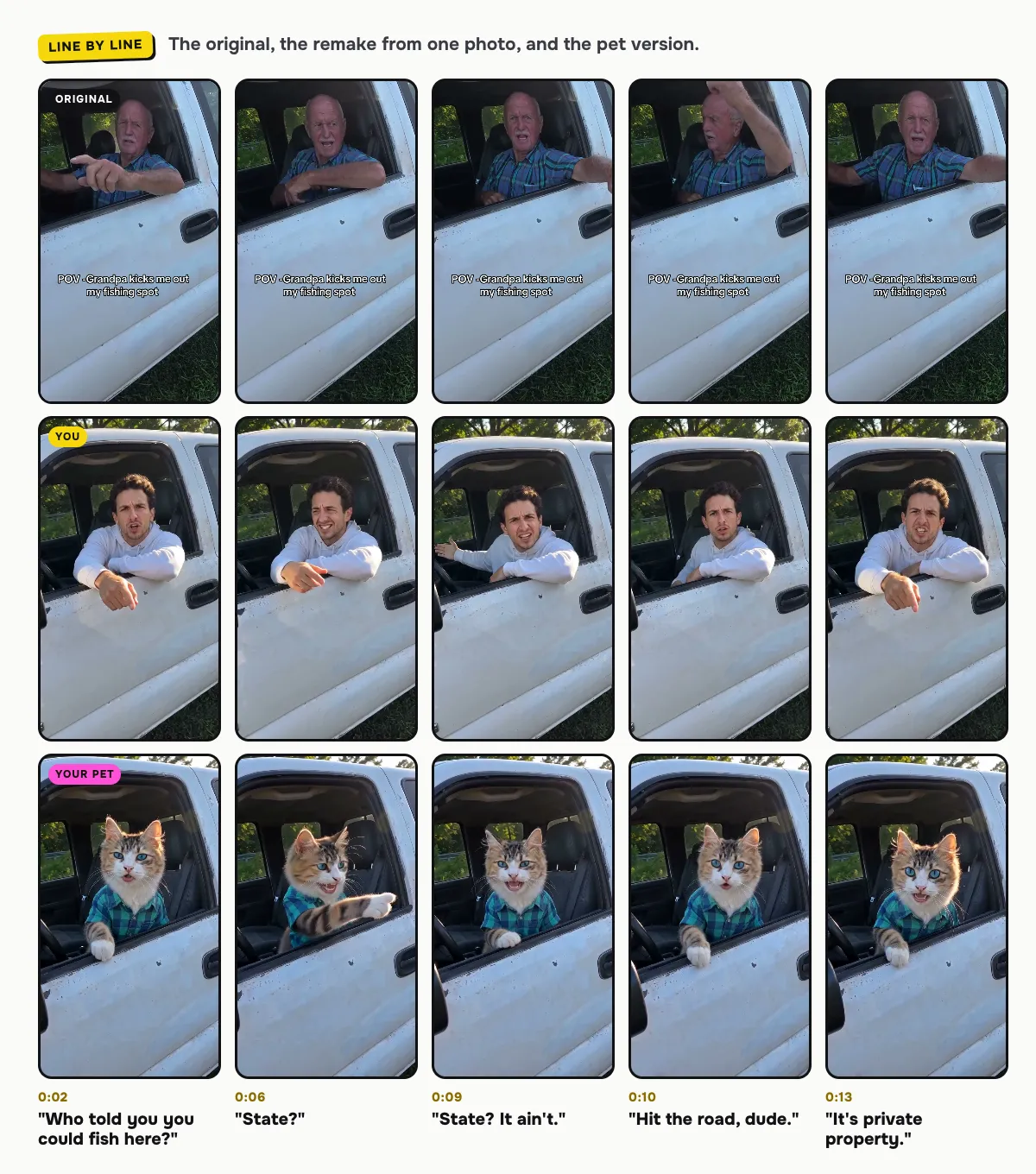
The pickup, the open window, the phone camera outside the door and every line come from the original. Only the driver changes:
| Time | Who speaks | What happens |
|---|---|---|
| 0:00–0:04 | The driver | "Oh, crew tractor. Yeah, who told you you could fish here?", pointing at the camera |
| 0:04–0:05 | The fisherman, off camera | "I thought it was state property." The driver listens, mouth shut, eyes narrowing |
| 0:06–0:10 | The driver | "State?… This?… State? It ain't." in growing disbelief |
| 0:10–0:11 | The driver | "Hit the road, dude." with a wave of the hand, or the paw |
| 0:11–0:15 | The driver | "This ain't no state property. It's private property." |
The person in your photo or your pet speaks every one of the driver's lines and keeps quiet while the fisherman talks. In our dog example the golden retriever looks more pleased than angry and saves its biggest reaction for "dude"; cats tend to sell the outrage best.
How to add the Hit the Road Dude sound on TikTok or Reels
- You kept Trend sound: the audio is already in the file. Post it as it is.
- You picked No song: in TikTok, tap Add sound and search for "hit the road dude" or "state property", then pick the original audio of the clip and line it up so "who told you" starts with the video. Reels works the same way with Audio.
Tips for a better result
- One subject per photo. A second person or pet in the frame confuses who should drive.
- Clear light. Daylight or soft indoor light keeps faces and fur sharp in the bright summer scene.
- Make a set. Make one of you and one of your cat or dog, and post them back to back with the same sound.
Is it free?
No. Every video is a real render that costs money to make, so there is no free version, free trial or watermarked preview. One video costs $9.99, the pricing page lists packs and plans that cost less per video, and failed renders are refunded in credits automatically. Unused packs bought by mistake can be refunded under the refund policy.