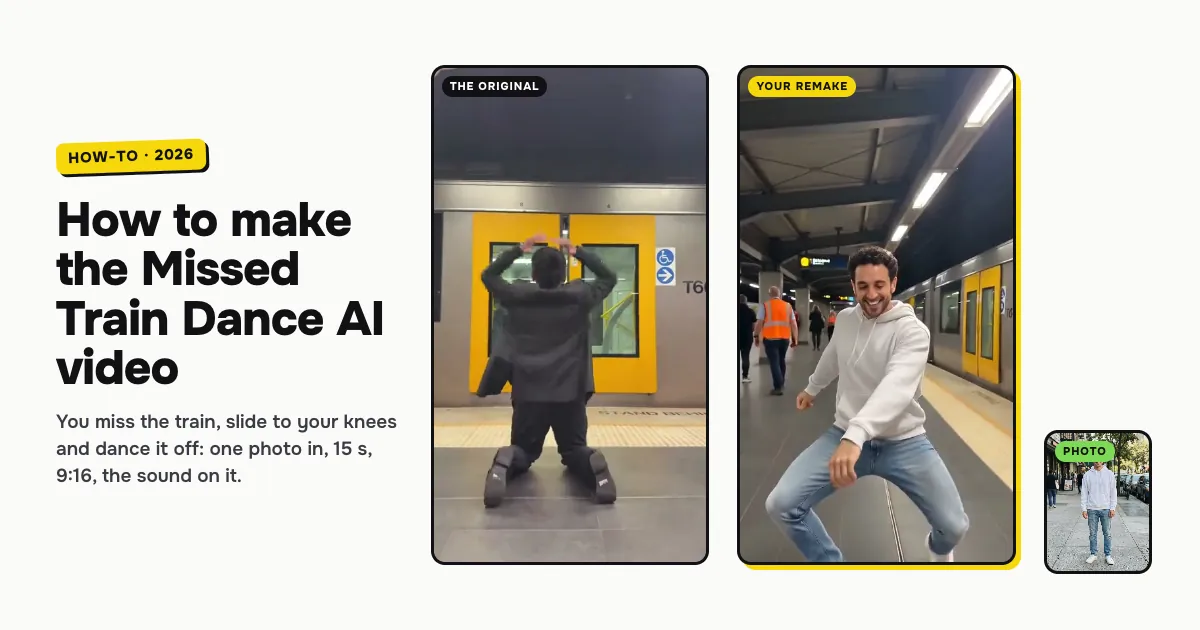
Short answer: to make the Missed Train Dance AI video, open the Missed Train Dance AI template on ClipRemake, add one clear photo of yourself and press Remake this. You take over the viral clip from a Sydney train station: the sprint down the stairs, the yellow doors shutting in your face, the knee slide and the collapse on the platform, then the dance. About five minutes later you download a 15-second, 9:16 MP4 with the clip's own sound and no watermark. One video costs $9.99, and there is no free version.
What is the Missed Train Dance AI trend?
On May 5, 2026 TikTok creator @zacjeremiah posted 15 seconds filmed in a Sydney train station. He sprints down the stairs, the camera chasing behind him, and reaches the platform just as the train's yellow doors close. He presses his hands against the doors, drops to his knees, slides across the floor and collapses. Two seconds later he is back on his feet, turns to the camera and dances it off while commuters and staff in orange vests look on.
From October 18 a CapCut template began putting new people into the same clip, and AI versions spread in the UK and the US from October 22. That is why people search for it as Missed Train Dance AI, the Missed Train Dance and the missed the train trend.
The joke is the switch: total despair on the platform floor, then a full dance as if nothing happened. The camera never cuts, so the version people want keeps the same run, the same slide and the same beat, and only changes who missed the train.
How to make the Missed Train Dance AI video, step by step
Step 1: Add one photo
Open the Missed Train Dance AI page. Tap the photo box (1 in the picture) and choose a clear photo of yourself.
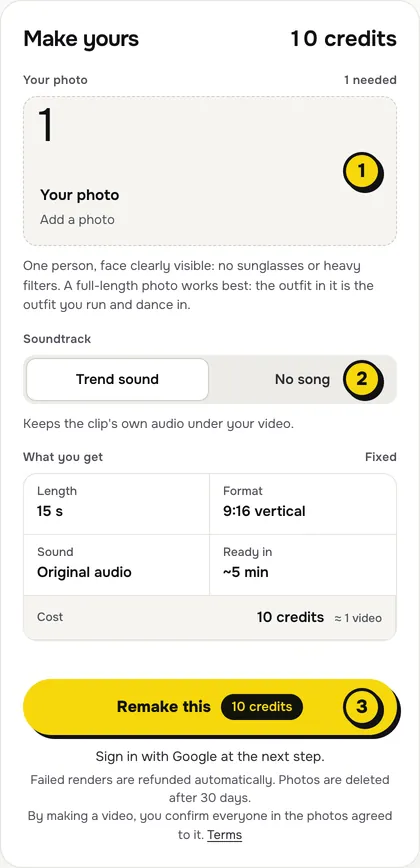
A full-length photo works best. The clothes and shoes in your photo are the ones you run, slide and dance in. If you use a selfie, the AI has to guess your trousers and shoes. Keep it to one person, face to the camera, with no sunglasses or heavy filters.
Step 2: Choose the sound
The switch (2) has two settings:
| Setting | What you get | When to pick it |
|---|---|---|
| Trend sound (default) | Your video with the clip's own 15 seconds of audio | You want it ready to post, beat for beat with the original |
| No song | A silent video | You will add the sound inside TikTok or Reels, the safer way if an app mutes reused audio |
Step 3: Press Remake this
Press Remake this (3). If you are not signed in, you sign in with Google first. If you have no credits yet, you pick a pack: one video is $9.99, and bigger packs and plans cost less per video. Pay by card, Apple Pay or Google Pay. If a render fails, the credits come back on their own.
Step 4: Download and post
About five minutes later the video is in My videos. Download the MP4: it is 15 seconds, 9:16, with no watermark. Switch on the AI-generated label when you post.
What your video looks like, beat by beat
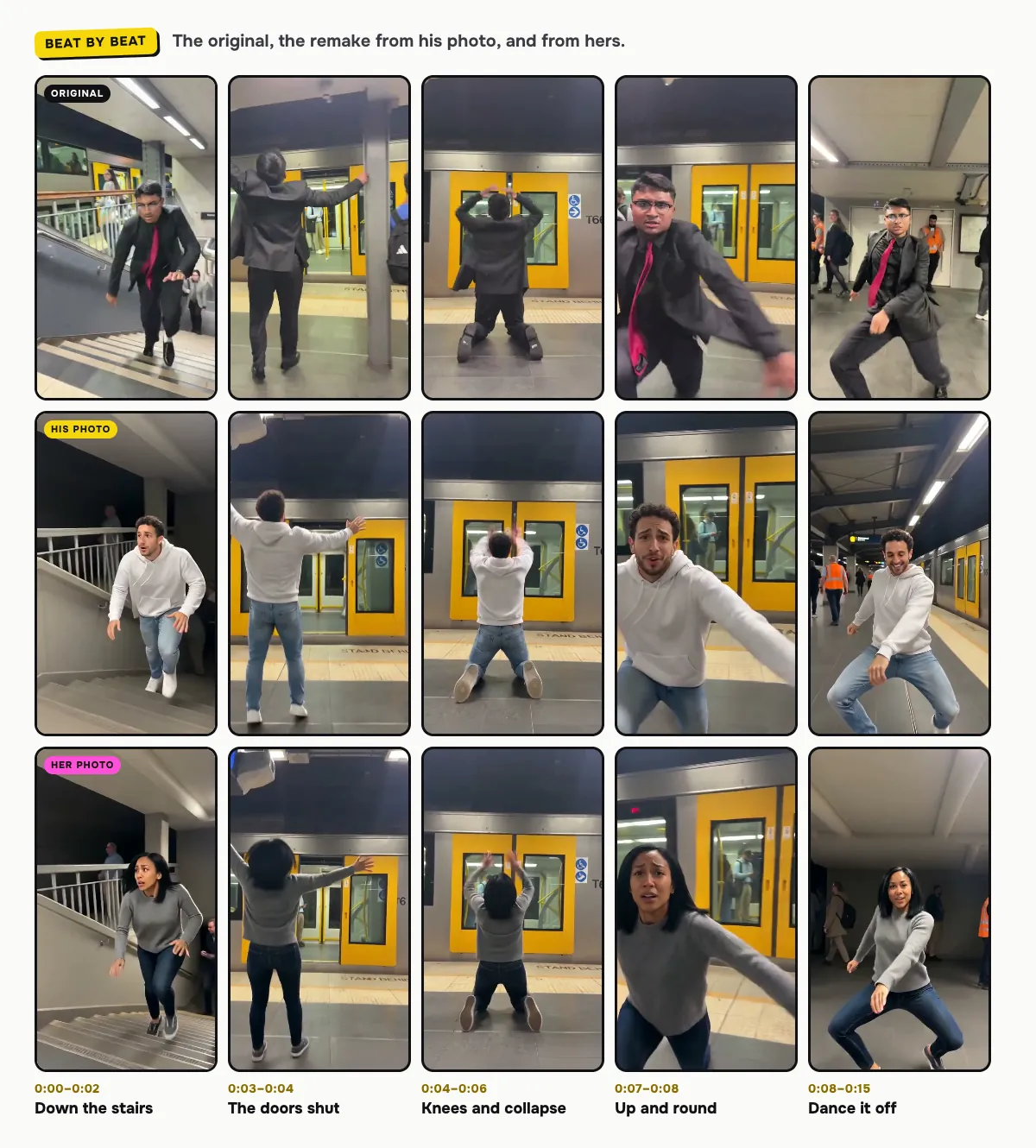
The stairs, the train doors, the platform, the handheld camera and the timing come from the original. Only the person changes:
| Time | What happens |
|---|---|
| 0:00–0:02 | You sprint down the station stairs, the camera chasing just behind |
| 0:03–0:04 | You reach the platform as the yellow doors shut, hands pressed against them |
| 0:04–0:06 | You drop to your knees, slide across the floor and collapse forward |
| 0:07–0:08 | You get up and swing round to the camera |
| 0:08–0:15 | You dance it off, station staff in orange vests behind you |
The AI keeps your face, hair, build and outfit through all of it. The station can shift a little between renders: in our man example the dance stays on the platform next to the train, and in the woman's it moves to the concourse, as in the original.
How to add the Missed Train Dance sound on TikTok or Reels
- You kept Trend sound: the audio is already in the file. Post it as it is.
- You picked No song: in TikTok, open the original clip by @zacjeremiah, tap its sound and choose Use this sound, then line it up so the run starts with the video. Reels works the same way with Audio.
Tips for a better result
- Full length, standing. Head to shoes, so the run and the dance show your real outfit.
- Clear light. Daylight or even indoor light keeps your face sharp under the station's strip lights.
- Send it to the one who is always late. It works best as a joke about someone: the friend who misses every train, bus and flight.
Is it free?
No. Every video is a real render that costs money to make, so there is no free version, free trial or watermarked preview. One video costs $9.99, the pricing page lists packs and plans that cost less per video, and failed renders are refunded in credits automatically. Unused packs bought by mistake can be refunded under the refund policy.