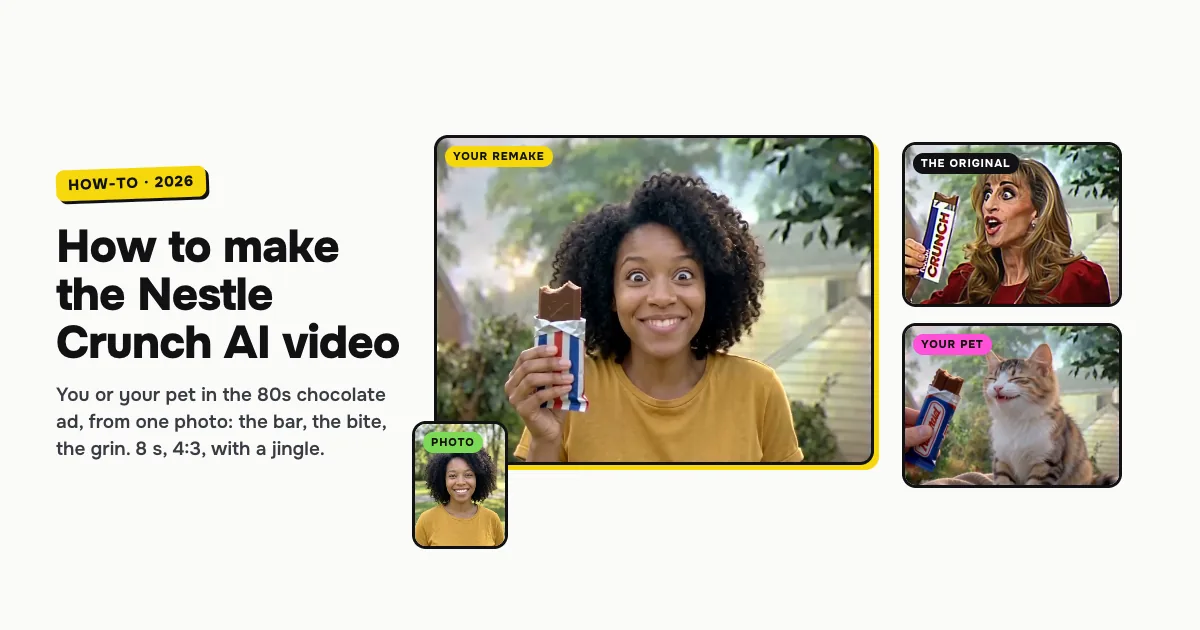
Short answer: to make the Nestle Crunch AI video, open the Nestle Crunch AI template on ClipRemake, pick You or Your pet, add one clear photo and press Remake this. You (or your cat or dog) star in a 1980s TV chocolate commercial: you hold up the bar with wide eyes, take a big crunchy bite and grin, in front of a sunny backyard. About five minutes later you download an 8-second MP4 in the TV's 4:3 frame, with a cheerful jingle and no watermark. The bar has a plain retro wrapper with no brand name on it. One video costs $9.99, and there is no free version.
What is the Nestle Crunch AI trend?
The Nestle Crunch AI trend runs on a CapCut AI template posted with the caption "pov: you always wanted to know how you'd look in this ad". It puts a face into the 1980s Nestle Crunch commercial, where the presenter holds up the chocolate bar, makes huge eyes at the camera, bites it and grins. From October 23, 2026, versions with grannies, friends and pets spread on TikTok, and a kitten version took off with them. AI template sites added their own makers from October 28.
The joke is how seriously an 80s ad took a chocolate bar: the wide eyes, the over-the-top bite, the cheeky grin. People search for Nestle Crunch AI, the Nestle Crunch ad trend and "how you'd look in this ad" to make their own without the CapCut app.
Who can be in it: you or your pet
| Pick | Photo | What happens |
|---|---|---|
| You | One adult, face clearly visible, front-facing, chest up | You play the presenter with your own face, hair and clothes: bar up, wide eyes, the bite, the grin |
| Your pet | One cat or dog, face and fur in view, facing the camera | A hand holds out the bar; your pet sniffs it, nibbles, squints with joy and licks its lips, with real paws and its own fur |
Both cost the same and last the same 8 seconds.
How to make the Nestle Crunch AI video, step by step
Step 1: Pick who stars in the ad
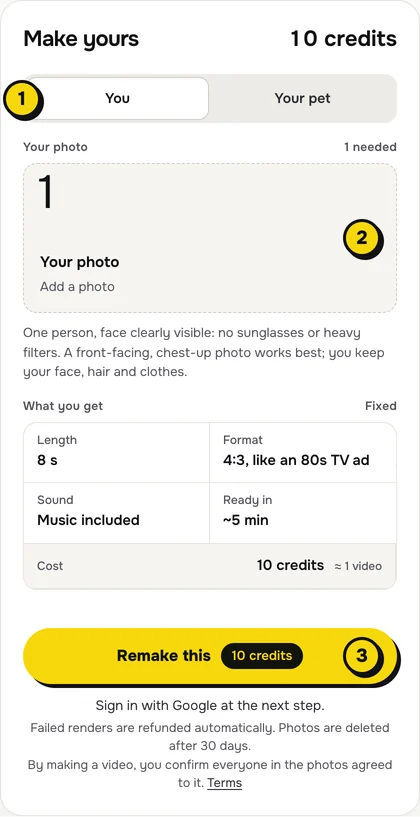
Open the Nestle Crunch AI page. At the top of the maker, choose You or Your pet (1 in the picture).
Step 2: Add one photo
Tap the photo box (2) and choose your photo:
- You: one person, face to the camera, no sunglasses or heavy filters. The whole ad is a close-up of your face, and a chest-up photo also shows the clothes you will wear in it.
- Your pet: a sharp photo of one cat or dog facing the camera, with its eyes and markings clear.
Ask a parent or grandparent for a photo and their OK, and you can show them how they would have looked in an 80s ad, like many of the trend's posts do.
Step 3: Press Remake this
Press Remake this (3). The card above the button shows what you get, and none of it needs setting: 8 seconds, 4:3 like an 80s TV ad, the jingle included, ready in about five minutes, 10 credits.
If you are not signed in, you sign in with Google first. If you have no credits yet, you pick a pack: one video is $9.99, and bigger packs and plans cost less per video. Pay by card, Apple Pay or Google Pay. If a render fails, the credits come back on their own.
Step 4: Download and post
About five minutes later the video is in My videos. Download the MP4: it is 8 seconds, 4:3, with the jingle and no watermark. Caption it "pov: you always wanted to know how you'd look in this ad", and switch on the AI-generated label when you post.
What your video looks like, beat by beat
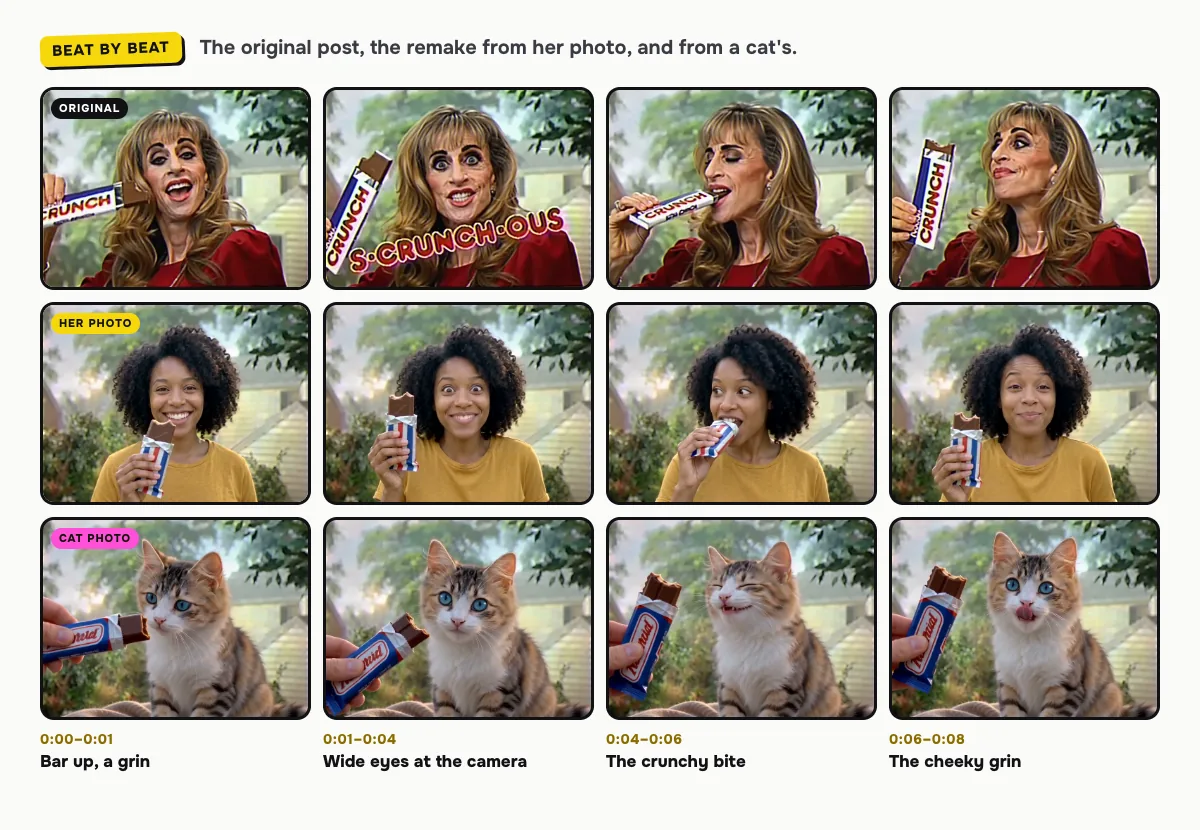
The sunny backyard, the soft 80s TV look and the moves come from the trend's ad. Only the presenter changes:
| Time | You | Your pet |
|---|---|---|
| 0:00–0:01 | The opened bar near your mouth, a big grin | Your pet sniffs the bar a hand holds out |
| 0:01–0:04 | The bar up beside your face, eyes wide, talking to the camera with huge delight | A nibble, then wide eyes at the camera and a little meow |
| 0:04–0:06 | A big crunchy bite, chewing happily | Your pet squints with joy, mouth open |
| 0:06–0:08 | A cheeky sideways grin, then back to the camera with raised eyebrows | Back to the camera, licking its lips |
The moments can shift a little between renders. In our example of her, the bite comes about a second early and she savors it with her eyes closed instead of the sideways look.
Why it's 4:3, and the sound
The ad is a 1980s TV picture, and the trend's posts show it that way, so your video is 4:3 rather than vertical. On TikTok or Reels it sits in the middle of the screen, with room for your caption above it.
Your video comes with its own 80s jingle, made with the video: bright synths and handclaps, a happy "mmm!" and the crunch of the bite (meows for a pet), with no brand names. To use the trend's sound instead, add it in TikTok with Add sound, then open Volume and turn the original sound down. Reels works the same way with Audio.
Tips for a better result
- Even light on the face. The close-up shows every detail, so a sharp, well-lit face keeps it looking like you.
- One subject per photo. A second person or pet in the frame confuses who should star in the ad.
- Make a pair. Make one of you and one of your cat or dog, and post them back to back.
Is it free?
No. Every video is a real render that costs money to make, so there is no free version, free trial or watermarked preview. One video costs $9.99, the pricing page lists packs and plans that cost less per video, and failed renders are refunded in credits automatically. Unused packs bought by mistake can be refunded under the refund policy.