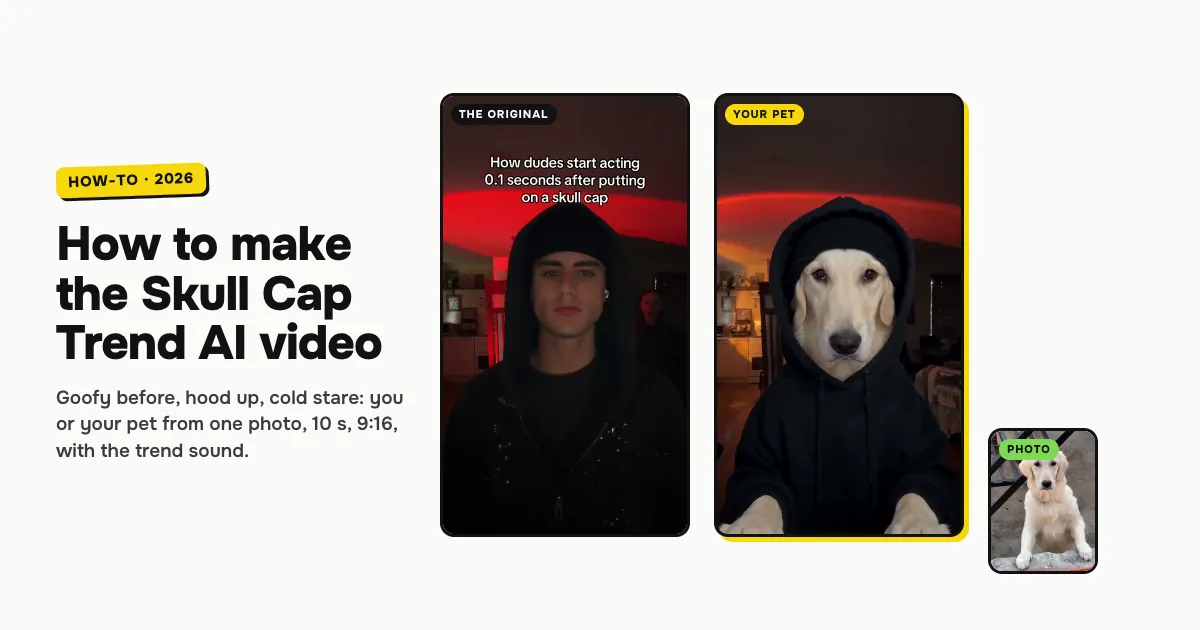
Short answer: to make the Skull Cap Trend AI video, open the Skull Cap Trend AI template on ClipRemake, pick You or Your pet, add one clear photo and press Remake this. You (or your dog or cat) start goofy in a bright living room with a black beanie, then a hard cut on the beat drop shows the same face with the hood up over a skull cap, in red light, with a cold stare. About five minutes later you download a 10-second, 9:16 MP4 with the trend sound and no watermark. One video costs $9.99, and there is no free version.
What is the Skull Cap Trend?
The skull cap trend is a TikTok glow-up from October 2026, also spelled the skullcap trend. Every post follows the same two halves:
- The before: a bright, messy room. You pull a silly face, fix your hair or fiddle with a black beanie.
- The after: a hard cut on the beat drop. The light goes dim, the hood is up over the skull cap, and you give the camera a slow, serious stare.
The caption is the joke, usually some version of "How dudes feel 0.1 seconds after putting on a skull cap". The first big post went up on October 14. From October 21, more posts passed 10 million plays each, and women and older people joined in. Know Your Meme added the trend on October 27.
The AI version lets anyone do it without a hoodie, a beanie or two lighting setups, and it lets pets do it too. That is why people search for Skull Cap Trend AI, the skull cap trend and the skullcap trend.
Who can be in it: you or your pet
| Pick | Photo | What happens |
|---|---|---|
| You | One adult, face clearly visible, front-facing, chest up | You keep your face in both halves and your own top in the before; after the cut you wear a black hoodie and skull cap |
| Your pet | One cat or dog, face and fur in view, facing the camera | It holds the beanie in its paws, then stares cold in a small black hoodie and skull cap, with real paws, never human hands |
Both cost the same and last the same 10 seconds.
How to make the Skull Cap Trend AI video, step by step
Step 1: Pick who goes cold
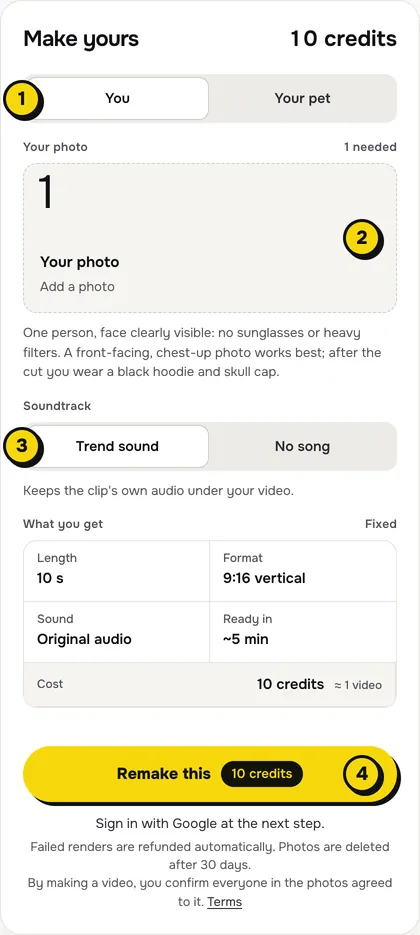
Open the Skull Cap Trend AI page. At the top of the maker, choose You or Your pet (1 in the picture).
Step 2: Add one photo
Tap the photo box (2) and choose your photo:
- You: one person, face to the camera, no sunglasses or heavy filters. A chest-up photo matches the selfie framing, and the face has to carry the stare in the dark half.
- Your pet: a sharp photo of one cat or dog facing the camera, with its eyes and markings clear.
Step 3: Choose the sound
The switch (3) has two settings:
| Setting | What you get | When to pick it |
|---|---|---|
| Trend sound (default) | Your video with the clip's own 10 seconds of audio, the beat drop on the cut | You want it ready to post, like the original |
| No song | A silent video | You will add the sound inside TikTok or Reels, the safer way if an app mutes reused audio |
Step 4: Press Remake this
Press Remake this (4). If you are not signed in, you sign in with Google first. If you have no credits yet, you pick a pack: one video is $9.99, and bigger packs and plans cost less per video. Pay by card, Apple Pay or Google Pay. If a render fails, the credits come back on their own.
Step 5: Download and post
About five minutes later the video is in My videos. Download the MP4: it is 10 seconds, 9:16, with no watermark. Write your own "0.1 seconds after putting on a skull cap" caption in TikTok, and switch on the AI-generated label when you post.
What your video looks like, beat by beat
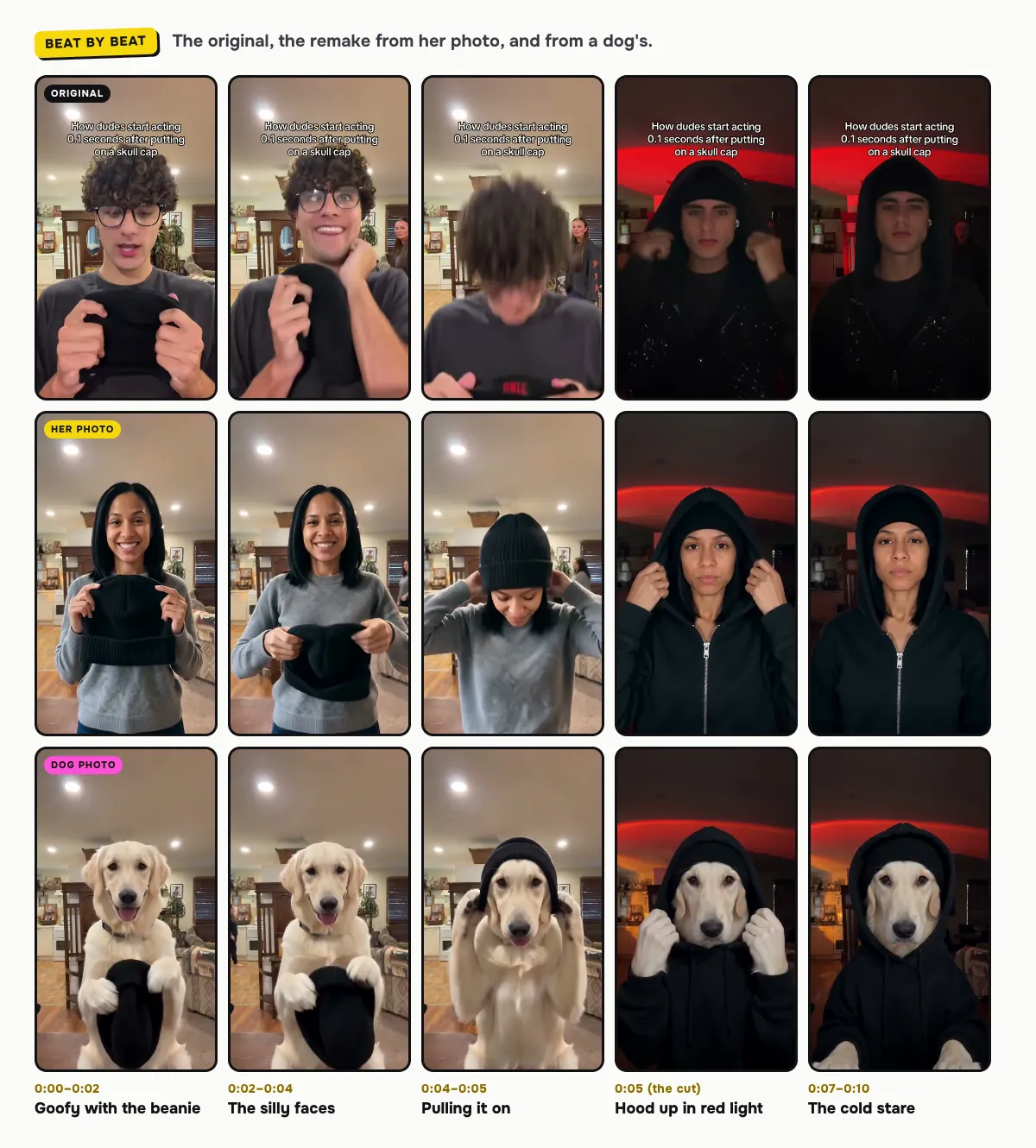
The living room, the cut, the red-lit room and the stare come from the original. Only the face (or the pet) changes:
| Time | What happens |
|---|---|
| 0:00–0:02 | A goofy grin at the camera, the black beanie held up in both hands |
| 0:02–0:04 | Silly faces: pointing at the beanie, a finger on the lips, a hand on the cheek |
| 0:04–0:05 | The beanie goes on |
| 0:05 | The hard cut on the beat drop: the dark room, red light, the hood pulled up over the skull cap |
| 0:07–0:10 | A cold, serious stare straight into the lens, mouth closed, to the end |
The exact moment of the cut can shift a little between renders. In our woman example it lands a quarter of a second early, and in one of our tests of a man it came about a second early. Pets get the same moves with paws: in our dog example, the golden retriever holds the beanie between its front paws and tugs the hood with them.
How to add the Skull Cap sound on TikTok or Reels
- You kept Trend sound: the audio is already in the file. Post it as it is.
- You picked No song: in TikTok, open any skull cap trend post, tap its sound and choose Use this sound, then line it up so the beat drops on your cut. Reels works the same way with Audio.
Tips for a better result
- Front-facing, even light. The after half is dark, so a clear, well-lit face in your photo is what keeps you recognizable under the hood.
- One subject per photo. A second person or pet in the frame confuses who should go cold.
- Make a pair. Make one of you and one of your dog, and post them back to back with the same sound.
Is it free?
No. Every video is a real render that costs money to make, so there is no free version, free trial or watermarked preview. One video costs $9.99, the pricing page lists packs and plans that cost less per video, and failed renders are refunded in credits automatically. Unused packs bought by mistake can be refunded under the refund policy.