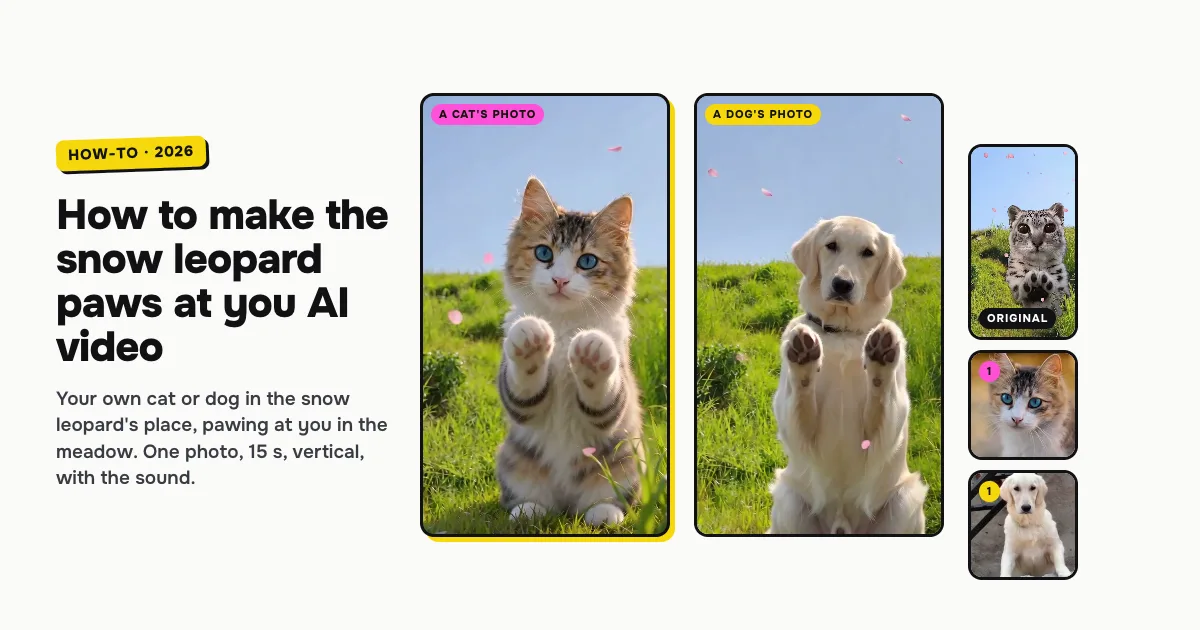
Short answer: to make the snow leopard "paws at you" AI video of your pet, open the Snow Leopard Paws at You AI template on ClipRemake, add one clear photo of your cat or dog and press Remake this. Your pet takes the snow leopard's place as itself, with its own face and fur, sits up in the sunny meadow under falling cherry petals and holds its paws up at you, like the viral reel. About five minutes later you download a 15-second, vertical 9:16 MP4 with the reel's own sound and no watermark. One video costs $9.99, and there is no free version.
What is the snow leopard "paws at you" meme?
In late October 2026 the "paws at you" meme took over TikTok: a snow leopard with huge, round, glossy eyes sits up and holds its paws out at you, as if it wants to be picked up. On October 28 TikTok creator @noperscan posted the reel this template copies: the big-eyed snow leopard in a sunny meadow, pink petals drifting down, pawing at the camera. It reached about a million plays by November 3.
Searches for "paws at you" have climbed every day since, and pet owners started making it with their own cats and dogs in the snow leopard's place. People search for it as paws at you, the snow leopard meme and the Mei Mei snow leopard.
Which pets work
One cat or one dog per photo. Your pet stays itself: its own face, eye colour and fur, with no snow leopard spots added, so everyone knows it is yours. It only takes the snow leopard's place and moves. Our two examples, a cat and a dog, are below. The template is made for pets, so it takes no photos of people.
How to make the snow leopard paws at you AI video, step by step
Step 1: Add your pet's photo
Open the Snow Leopard Paws at You AI page. Tap the photo box (1 in the picture) and choose a photo of your pet.
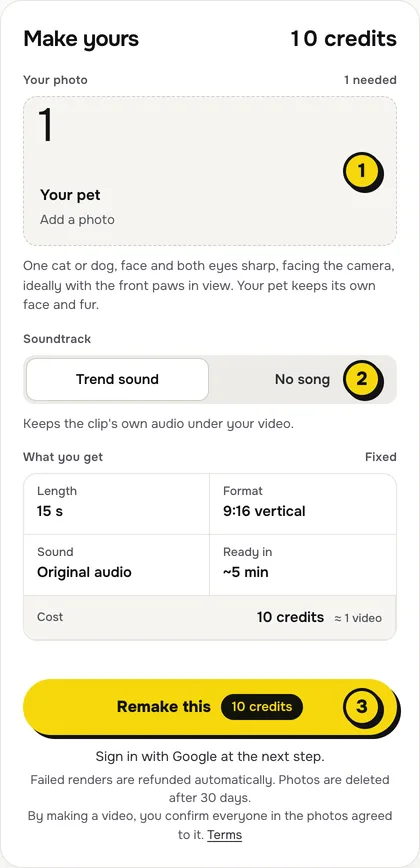
- One pet, facing the camera, both eyes open and sharp: the eyes carry the meme.
- From the ears to the belly, ideally with the front paws in view, so it has paws to raise.
- Good light, no filters or stickers over the face.
Step 2: Choose the sound
The switch (2) has two settings:
| Setting | What you get | When to pick it |
|---|---|---|
| Trend sound (default) | Your video with the reel's own 15 seconds of audio | You want it ready to post, like the original |
| No song | A silent video | You will add a sound inside TikTok or Reels |
Step 3: Press Remake this
Press Remake this (3). If you are not signed in, you sign in with Google first. If you have no credits yet, you pick a pack: one video is $9.99, and bigger packs and plans cost less per video. Pay by card, Apple Pay or Google Pay. If a render fails, the credits come back on their own.
Step 4: Download and post
About five minutes later the video is in My videos. Download the MP4: it is 15 seconds, vertical 9:16, with no watermark. Post it with "paws at you" and switch on the AI-generated label.
What your video looks like, moment by moment
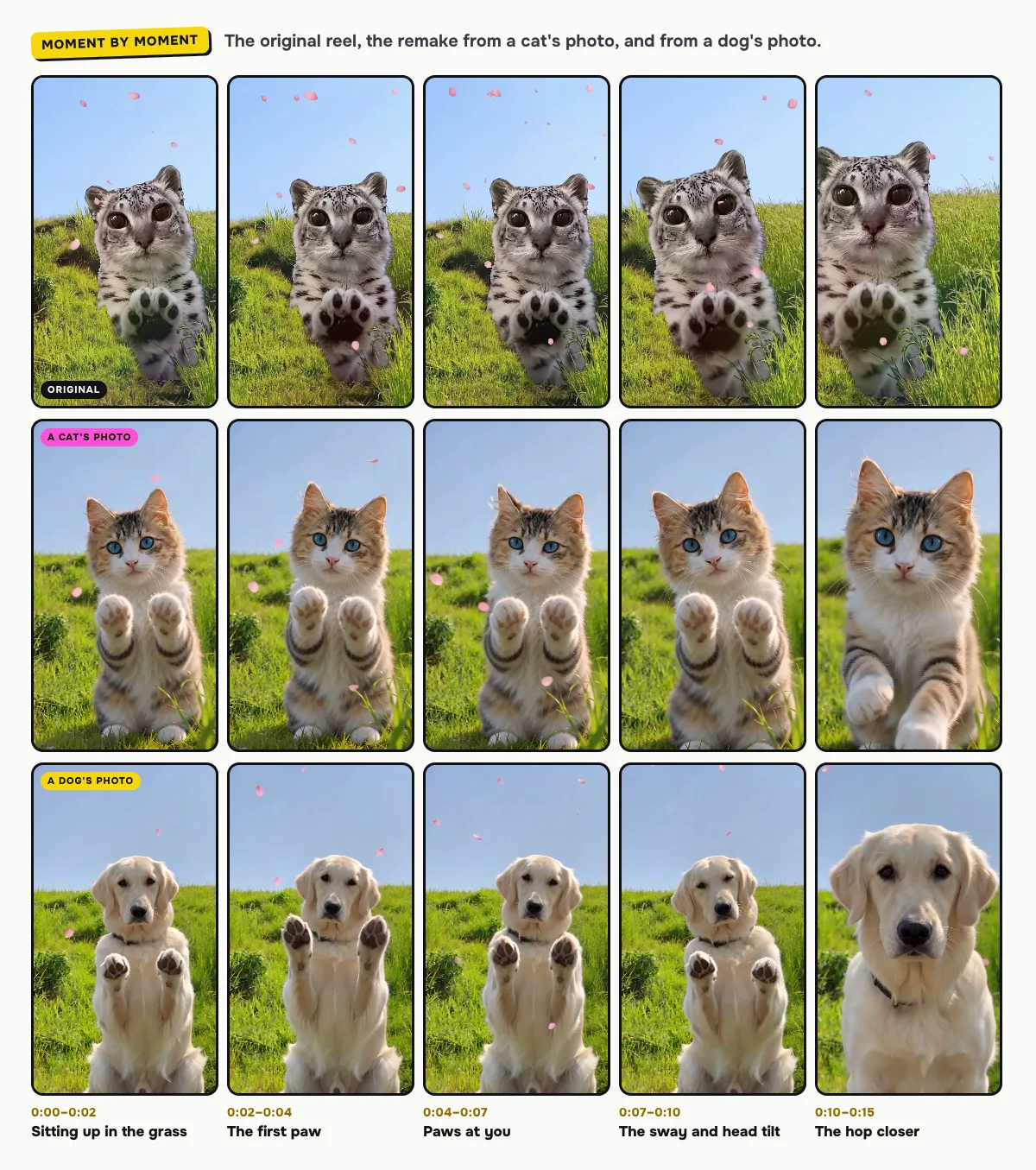
The meadow, the petals and every move come from the reel's first 15 seconds, framed vertically around the snow leopard. Only the animal changes:
| Time | What happens |
|---|---|
| 0:00–0:02 | Your pet sits up in the tall grass, looking into the lens |
| 0:02–0:07 | It raises its front paws toward the camera, paw pads showing, and pats the air |
| 0:07–0:10 | It sways and tilts its head, paws still up |
| 0:10–0:15 | It hops a little closer and reaches for the lens one more time |
The moments can shift a little between renders: our cat sat up with both paws raised, the dog stood up on its back legs.
Tips for a better result
- Sharp eyes. A blurry or half-closed eye makes the big meme eyes look wrong.
- One pet per photo. A second animal in the frame confuses which one paws at you.
- Its usual look. No costume, filter or hat: what is in the photo is what paws at you.
Is it free?
No. Every video is a real render that costs money to make, so there is no free version, free trial or watermarked preview. One video costs $9.99, the pricing page lists packs and plans that cost less per video, and failed renders are refunded in credits automatically. Unused packs bought by mistake can be refunded under the refund policy.