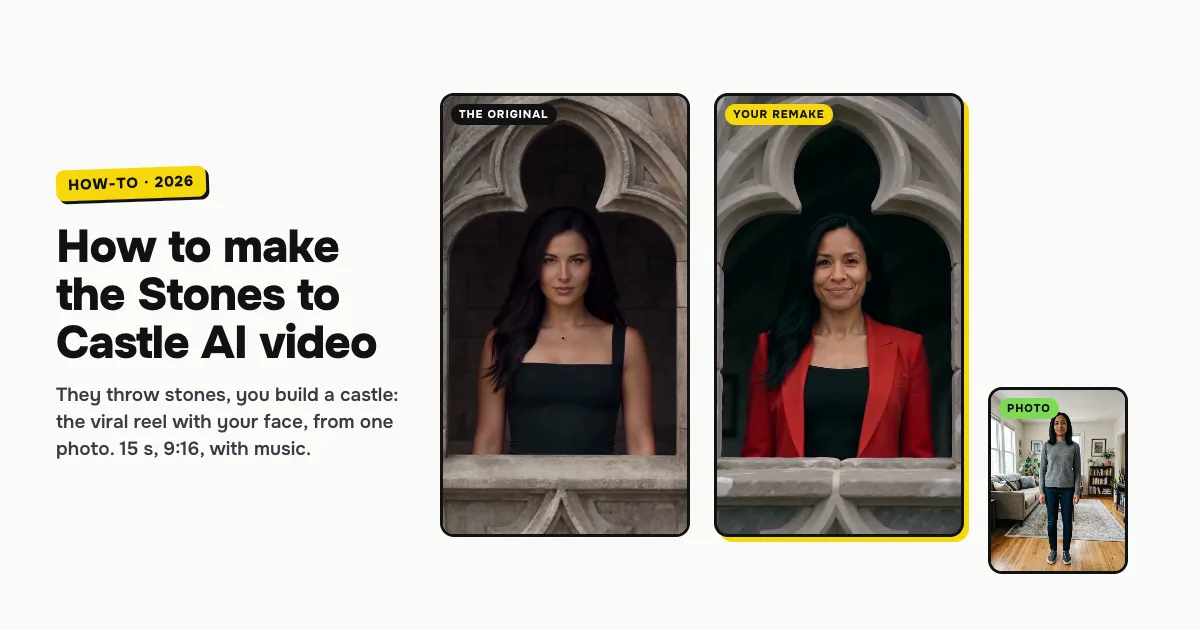
Short answer: to make the Stones to Castle AI video, open the Stones to Castle AI template on ClipRemake, add one clear photo of yourself and press Remake this. The viral reel is filmed again with you in the lead: an angry crowd in a green valley throws stones at you, you stay calm in a red suit, pick the stones up, they rise into a wall and then a huge gothic castle, and you smile down from its window. About five minutes later you download a 15-second, 9:16 MP4 with an orchestral score and no watermark. One video costs $9.99, and there is no free version.
What is the Stones to Castle AI trend?
Stones to Castle is an AI reel of an old saying: build a castle with the stones they throw at you. @bognina_anastasia_ posted it on Instagram on October 21, 2026. In it, an angry crowd in a green mountain valley shouts and throws stones at a calm woman in a red suit. She doesn't say a word. She picks the stones up, they turn into a stone wall and then a castle, the crowd stares up at it, and the last shot is her smiling from a castle window.
The reel is itself an AI video: the crowd, the valley and the castle were all generated. From October 27, AI template sites added copies of it so people could put themselves in her place, and people post theirs about haters, exes, bosses and anyone who doubted them. That is why people search for Stones to Castle AI, "they threw stones at me so I built a castle" and "build a castle with the stones they throw at you".
Who can be in it
One adult, from one photo. You keep your face, hair and skin tone, and you wear the red suit that makes you stand out from the crowd. Women and men both work: our examples below are one of each, made the same way.
It is made for people only. A pet can't be the castle builder yet; for a pet, try Nestle Crunch AI or Skull Cap Trend AI, which both have a Your pet option.
How to make the Stones to Castle AI video, step by step
Step 1: Add one photo
Open the Stones to Castle AI page. There is nothing to pick: one photo, one 15-second reel. Tap the photo box (1 in the picture) and choose your photo.
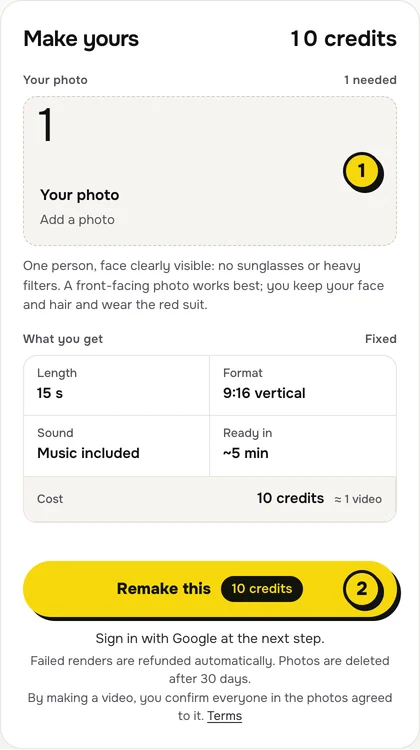
- One person, face to the camera, no sunglasses or heavy filters.
- The face matters most. The window shot at the end shows your face large, so a sharp, well-lit face is what makes it look like you. Our example of her used a full-length photo, and a chest-up one works just as well.
- Your hair comes from the photo, so pick one where it looks the way you like.
Step 2: Press Remake this
Press Remake this (2). The card above the button shows what you get, and none of it needs setting: 15 seconds, 9:16 vertical, the music included, ready in about five minutes, 10 credits.
If you are not signed in, you sign in with Google first. If you have no credits yet, you pick a pack: one video is $9.99, and bigger packs and plans cost less per video. Pay by card, Apple Pay or Google Pay. If a render fails, the credits come back on their own.
Step 3: Download and post
About five minutes later the video is in My videos. Download the MP4: it is 15 seconds, 9:16, with an orchestral score and no watermark. Caption it with what your stones were, and switch on the AI-generated label when you post.
What your video looks like, shot by shot
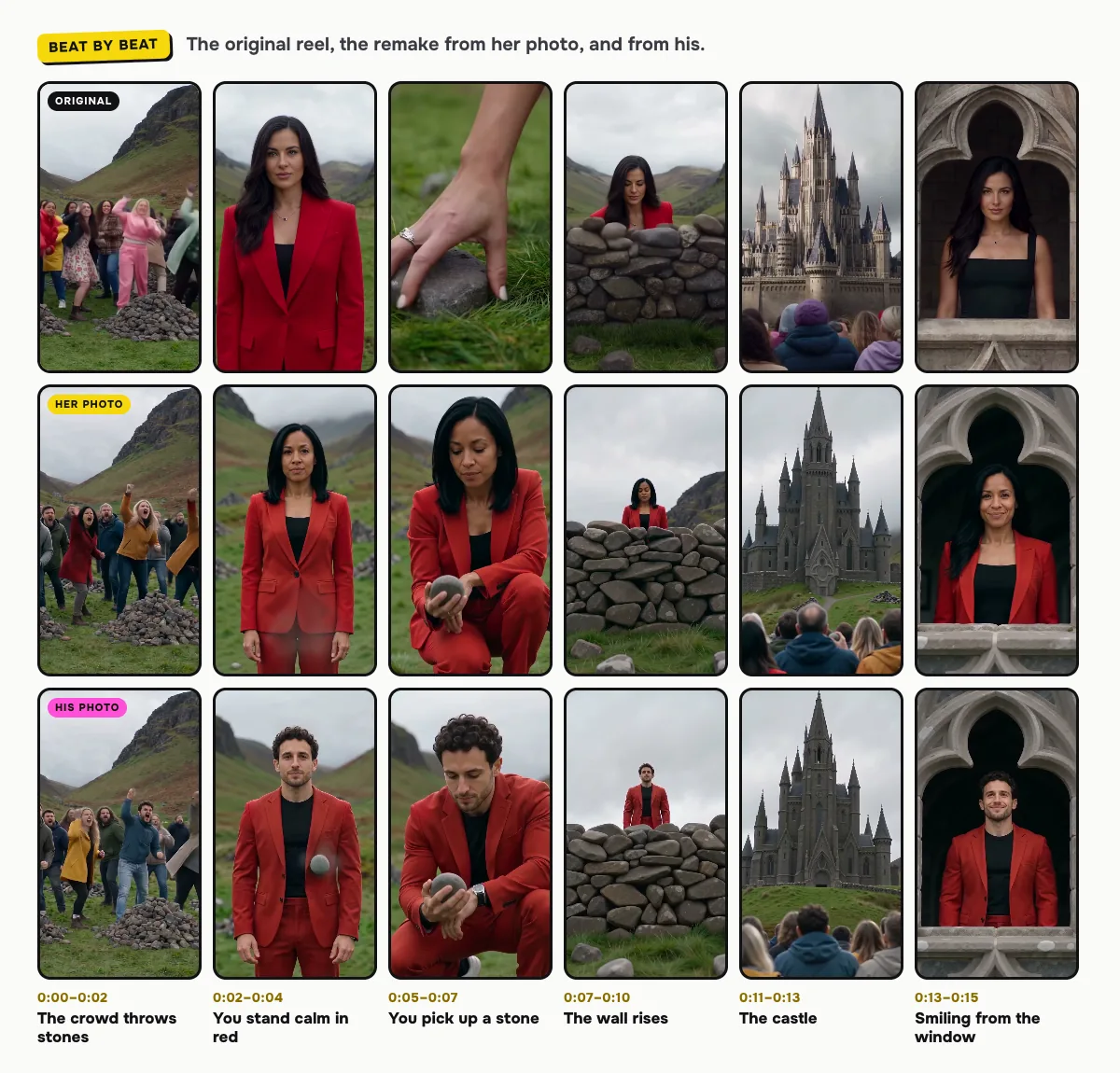
The valley, the crowd, the wall and the castle come from the reel. Only the person in red changes:
| Time | What happens |
|---|---|
| 0:00–0:02 | Wide shot: an angry crowd in colorful jackets behind piles of grey stones in a green mountain valley, some of them throwing |
| 0:02–0:03 | From above: the crowd on the left beside a long stone path, you alone in red on the grass on the right |
| 0:03–0:04 | You stand calm, facing the camera in the red suit, while a stone lands nearby |
| 0:04–0:05 | Close-ups of the crowd shouting and pointing |
| 0:05–0:07 | Your hand picks a stone up from the grass, then you crouch and look down at it |
| 0:07–0:10 | You stand behind a dry-stone wall that rises higher and higher as the camera tilts up |
| 0:10–0:11 | You stand small on top of a tall stone tower |
| 0:11–0:13 | The huge gothic castle with tall spires, then the crowd staring up at it, stones still in their hands |
| 0:13–0:15 | You look out of an arched castle window and smile |
The cuts can shift a little between renders. In both our examples the first cuts come half a second to a second early and the angry close-ups run a little longer, and the tower is a slimmer spire than the original's. In the original she has taken the jacket off for the window shot; in our examples the red blazer stays on.
The sound, and how to change it on TikTok or Reels
Your video comes with its own orchestral score, made with the video: tense at the start, with the crowd shouting and stones landing, and triumphant when the castle appears. It has no words, so you can post it as it is.
To use another sound, add it in TikTok with Add sound, then open Volume and turn the original sound down. Reels works the same way with Audio.
Tips for a better result
- Even, soft light. A photo in daylight blends best with the overcast valley of the reel.
- One person per photo. A second face in the frame confuses who should be the one in red.
- Make one for a friend. Someone who got through a hard year deserves to watch the stones turn into a castle; make it with their photo and their OK.
Is it free?
No. Every video is a real render that costs money to make, so there is no free version, free trial or watermarked preview. One video costs $9.99, the pricing page lists packs and plans that cost less per video, and failed renders are refunded in credits automatically. Unused packs bought by mistake can be refunded under the refund policy.