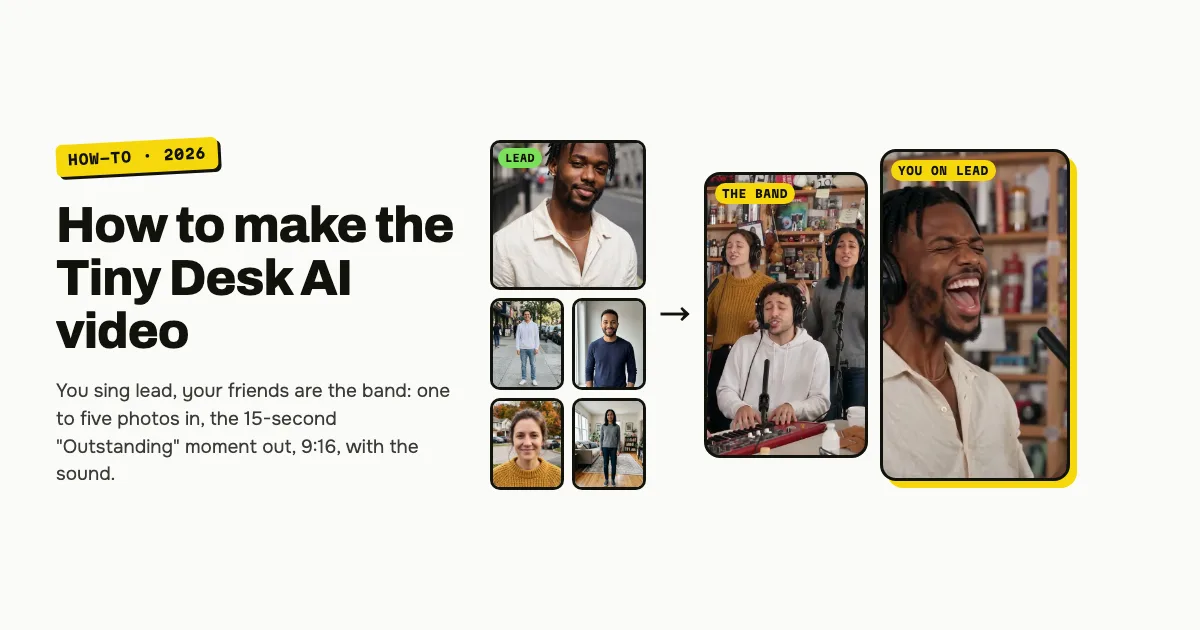
Short answer: to make the Tiny Desk AI video, open the Tiny Desk AI template on ClipRemake, add one clear photo for the lead singer, add up to four friends for the band if you like, and press Remake this. About five minutes later you download 15 seconds of the viral "Outstanding" video filmed again with your faces: the band at the desk singing the opening line, the lead singer's long note, big laugh and wave, then the sax solo. It is a 9:16 MP4 with the original sound (or none) and no watermark. One video costs $9.99 with one photo or five, and there is no free version.
What is the Tiny Desk AI trend?
The trend recasts the closing seconds of Charlie Wilson's NPR Tiny Desk concert from June 2023, where the set ends on The Gap Band's "Outstanding": the band at the desk, a long note that breaks into a huge laugh and a wave, then a sax solo.
On October 18, 2026 a TikTok account posted a 19-second AI version with five college football head coaches who had just lost as the band, most of them in sideline headsets. Most Tiny Desk AI videos now copy that version shot for shot, and so does this maker (its first cut to the desk through the sax solo). NFL versions followed within days, and then people started casting their friends, coworkers and group chats. That is why it is searched as Tiny Desk AI, the Outstanding Tiny Desk trend and the Tiny Desk meme.
The joke is the casting: the band plays it completely straight, and the laugh in the middle lands on whoever you put on lead.
What you need
- One photo for the lead singer. Front-facing, the whole face visible, no sunglasses, masks or heavy filters, one person in the frame.
- Up to four more photos (optional). One adult per photo, for the keyboard, the sax and the two backup singers. Everyone in a photo must be an adult who agreed to be in the video.
- A Google account, so the video is saved to My videos.
- One video's credits: 10 credits, $9.99 on its own, however many photos you add.
How to make the Tiny Desk AI video, step by step
Step 1: Add the lead singer
Open the Tiny Desk AI page and tap the big seat marked 1 · Lead singer. This person gets the close-up, the long note, the laugh and the wave.
Step 2: Add the band (optional)
The four smaller seats are Keyboard, Sax and two Backup singer seats. Fill any of them, in any order. Leave a seat empty and an AI musician who looks like none of your photos plays it. The price does not change.
Step 3: Choose the sound
| Setting | What you get | When to pick it |
|---|---|---|
| Trend sound (default) | Your video with the performance's own 15 seconds of audio | You want it ready to post |
| No song | A silent video | You will add the sound inside TikTok or Reels, the safer way if an app mutes copyrighted audio |
Step 4: Press Remake this
If you are not signed in, you sign in with Google first. If you have no credits yet, you pick a pack: one video is $9.99, and bigger packs and plans cost less per video. If a render fails, the credits come back on their own.
Step 5: Download and post
About five minutes later the video is in My videos. Download the MP4: 15 seconds, 9:16, no watermark. Switch on the AI-generated label when you post, and tag your band.
Which photo goes in which seat?
The desk, the camera and the three shots come from the viral video. Each photo takes one seat, and each seat is on screen at a different time:
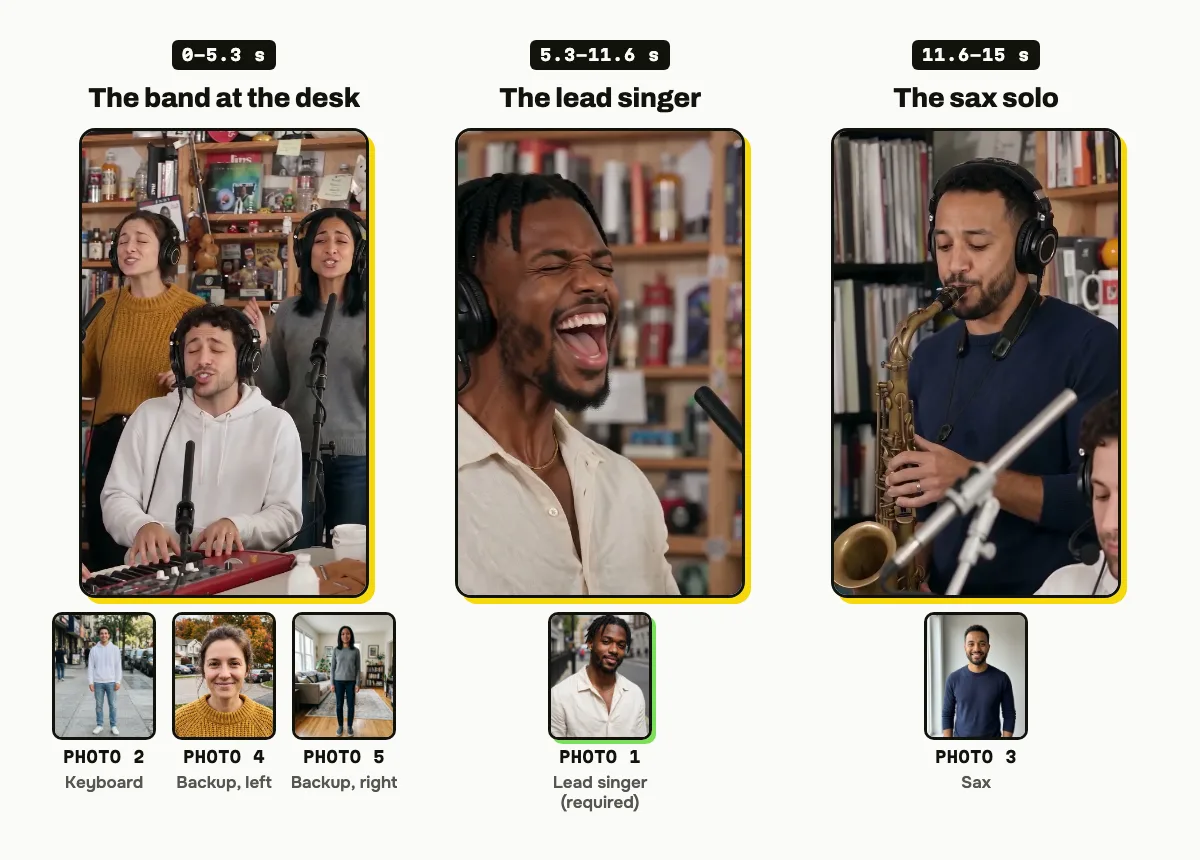
| Seat | On screen | Who to put there |
|---|---|---|
| 1 · Lead singer (required) | 5.3–11.6 s, close-up, the laugh and the wave | The star of the joke: the birthday person, whoever lost the bet, you |
| 2 · Keyboard | 0–5.3 s, front of the band | Someone who looks good concentrating |
| 3 · Sax | 11.6–15 s, close-up | The friend who deserves a solo |
| 4 · Backup, left | 0–5.3 s, behind the keyboard on the left | Anyone who loves to sing along |
| 5 · Backup, right | 0–5.3 s, behind the keyboard on the right | The hype person |
The pictures above come from our own example: five photos of AI-generated adults in, one render out, unedited.
Tips for a better result
- One person per photo. A group photo puts the wrong face in the seat; crop to one person first.
- Put the big personality on lead. Photo 1 is on screen the longest and gets the laugh.
- Even light beats a filter. A plain, evenly lit photo reads better at the warm, busy desk than a dark or heavily edited one.
Is it free?
No. Every video is a real render of the whole 15-second moment, so there is no free version, free trial or watermarked preview. One video costs $9.99, the pricing page lists packs and plans that cost less per video, and failed renders are refunded in credits automatically. Unused packs bought by mistake can be refunded under the refund policy.