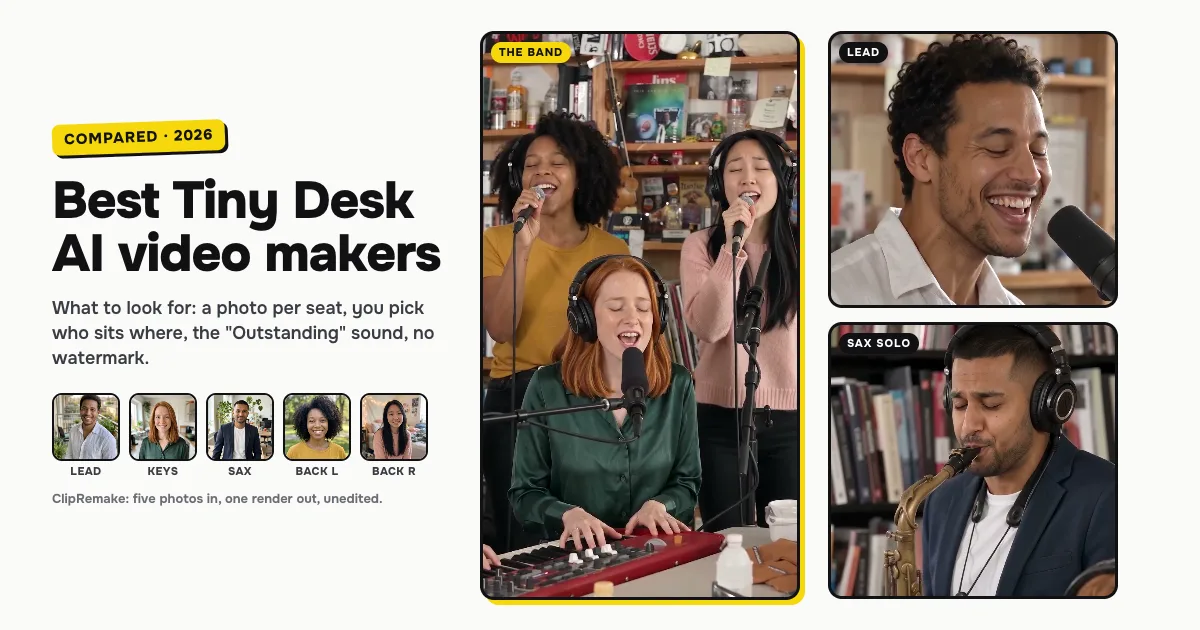
Short answer: the best Tiny Desk AI maker re-films the viral "Outstanding" desk concert itself, takes one photo per band member, lets you choose who sits where and keeps the sound. ClipRemake's Tiny Desk AI (this one is ours) does exactly that: one to five photos in, you choose the lead singer, the keyboard, the sax and the two backup singers, and about five minutes later you download a 15-second, 9:16 MP4 with the performance's own sound (or a silent version) and no watermark, $9.99 a video with one photo or five. Dedicated Tiny Desk sites such as aitinydeskvideo.com, tinydeskaitrend.com, tiny-desk-ai.com, tiny-desk-ai.video and tinydeskai.tv, and template sites such as remakeyourmeme.com and makeviral.ai, make the same kind of clip; they differ in how many seats you fill, whether you choose the seats and whether the original sound is kept. Dreamina (CapCut's AI video app) and createvision.ai make a new desk concert from a prompt or one photo instead.
What's new on this page
- 31 October 2026: first version. We read every tool's own Tiny Desk page on this day; the table only repeats what those pages say.
Is there an "Outstanding" Tiny Desk AI template?
People search for the "Outstanding Tiny Desk AI template" because most video trends run on a CapCut template. This one mostly doesn't. On 31 October 2026 we found no Tiny Desk or "Outstanding" template page on capcut.com. CapCut's AI video app, Dreamina, has a Tiny Desk page, but it is a prompt box: you describe a desk concert and it films a new one, and the page doesn't mention "Outstanding", the sax solo or the backup singers. Kapwing's how-to describes an editor template with four video placeholders that you fill with AI clips of your own.
The template most people mean is a maker that already holds the viral video and only needs your photos. That is what the Tiny Desk AI template on ClipRemake is: five seats, a photo in each one you want, and the 15-second "Outstanding" moment filmed again with your faces, from the band singing the opening line through the lead singer's laugh and wave to the sax solo.
Three kinds of Tiny Desk AI tool
Re-film makers use the viral video as the reference and put your photos into it: the same desk, the same shots, the same timing, usually with the sound. ClipRemake and the dedicated Tiny Desk sites work this way, and the result is the clip people are posting, with your band in it.
Prompt and photo generators (general AI video apps, Dreamina, createvision.ai) make a new desk-concert clip from your words or one photo. It looks like a Tiny Desk, but it isn't the viral moment, and you write or pick the prompt.
Editor templates (Kapwing) give you a timeline with placeholders; you bring the clips and cut them together.
None of these is wrong; they make different things. If you want the video everyone is recasting, you want a re-film maker.
The tools side by side
What each tool's own page said on 31 October 2026. "Not stated" means the page didn't say.
| Tool | Kind | Band from your photos | You choose the seats | The "Outstanding" sound | Silent version too | Watermark-free |
|---|---|---|---|---|---|---|
| ClipRemake Tiny Desk AI (us) | Re-film maker | Yes, 1 to 5 photos | Yes: lead, keyboard, sax, two backup singers | Yes | Yes (No song) | Yes, always |
| aitinydeskvideo.com | Tiny Desk site | Yes, 1 to 5 photos | No: by upload order | Yes | Yes | Yes |
| tinydeskaitrend.com | Tiny Desk site | Yes, up to 5 photos | Yes | Yes | Not stated | Yes |
| tiny-desk-ai.com | Tiny Desk site | Yes, 1 to 5 photos | Yes, drag to swap | Yes | Yes | Not stated |
| tiny-desk-ai.video | Tiny Desk site | Yes, 1 to 5 photos | Yes | Yes | Not stated | No site watermark |
| tinydeskai.tv | Tiny Desk site | Two seats: lead and tambourine singer | Two seats only | No: AI-generated sound | Yes | Yes |
| remakeyourmeme.com | Template site | Yes, 1 to 5 photos | Yes | Yes | Not stated | Yes |
| makeviral.ai | Template site | Yes, up to 5 photos | No: by photo order | No: a new funk groove | Not stated | Yes |
| createvision.ai | AI video platform | One person | No band seats | No: a wordless melody | Yes (audio off) | Not stated |
| Dreamina (CapCut) | Prompt generator | Not stated | Through your prompt | Not stated | Not stated | Paid plans only |
| Kapwing | Editor template | Your own clips, four placeholders | You place the clips | Not stated | Not stated | Not stated |
Each one in a sentence or two
- ClipRemake Tiny Desk AI (ours): re-films 15 seconds of the viral "Outstanding" video, from the first cut to the desk through the sax solo, with your photos in the seats you choose; an empty seat gets an AI musician, and the price is the same with one photo or five. Make one here. Not for: pets in the band (people only for now), or one group photo in one go: each seat takes its own photo.
- aitinydeskvideo.com: a dedicated Tiny Desk site; one to five photos of people, dogs or cats, where the first photo is the lead singer and the rest follow upload order. Not for: choosing who plays the sax without reordering your uploads.
- tinydeskaitrend.com: a dedicated Tiny Desk site with five named seats, a pet switch and a choice of 9:16, 1:1 or 16:9. Not for: a silent copy to post with TikTok's own sound; the page doesn't mention one.
- tiny-desk-ai.com: a dedicated Tiny Desk site for one to five people or pets; you drag photos between roles and get the reference audio plus a silent copy. Not for: knowing about watermarks or render time before you pay; the page doesn't say.
- tiny-desk-ai.video: a dedicated Tiny Desk site with a required lead, four optional named roles and the "Outstanding" soundtrack. Not for: pets or a silent version; the page mentions neither.
- tinydeskai.tv: a dedicated Tiny Desk site with two seats, the lead and the tambourine singer; the sax and the back row stay as they were, and the sound is AI-generated. Not for: a full band of friends, or the original song.
- remakeyourmeme.com: a meme-video site with a Tiny Desk template among many others: a lead plus four optional seats, people or pets, with the song kept. Not for: a silent copy; the page doesn't mention one.
- makeviral.ai: a trend-template site with Tiny Desk variants for one, two, three or five people and a pet; roles follow photo order, and the music is a new funk groove, so you add "Outstanding" inside TikTok. Not for: the original sound in the file.
- createvision.ai: a general AI creation platform with a one-person Tiny Desk page, where you pick the length and the format. Not for: a band of friends, or the original song.
- Dreamina (CapCut): CapCut's AI video app; its Tiny Desk page is a prompt generator where you name the lead and the players. Not for: the viral "Outstanding" moment itself; the page never mentions it.
- Kapwing: an online video editor whose how-to describes a Tiny Desk template with four video placeholders. Not for: anyone who doesn't already have the clips.
Is there a free Tiny Desk AI video generator?
Yes, with limits. Some tools hand out a few free credits or a short preview, but free clips are usually watermarked, a few seconds long or low resolution. The general AI video apps that give free credits don't know the Tiny Desk moment either: you write a prompt and get a new desk concert, not the viral cut with your friends in the seats. ClipRemake has no free tier, because every clip is a real render of the whole 15-second moment: one video is $9.99 with one photo or five, with no watermark, and a render that fails gives its credits back automatically.
How to choose in ten seconds
- You and your friends as the band, with the original sound? ClipRemake: a photo per seat, you choose the seats, the same price with one photo or five.
- Just you on lead? ClipRemake too: one photo, and AI musicians fill the band.
- Your dog in the band? A Tiny Desk site that takes pets, such as tiny-desk-ai.com or remakeyourmeme.com.
- A desk concert of your own, not the viral one? A prompt generator such as Dreamina.
Tips for a good result from any tool
- One adult per photo. Face fully visible, no sunglasses or heavy filters, even light. Crop a group photo to one face per seat, from the chest up.
- Put the biggest personality on lead. The lead singer is on screen the longest and gets the long note, the laugh and the wave.
- Give the sax to someone who deserves a solo. The sax player has the last three seconds to themselves.
- Keep a silent copy for posting. Some apps mute copyrighted audio; a silent video plus the sound from TikTok's library is the safer way.
The step-by-step Tiny Desk AI guide shows which seat is on screen when, with pictures from one of our renders.
Before you pay, on any site
- Adults only, with consent. Only photos of adults who agreed to be in the video; no celebrities, no children. Every tool here is a fan tool, not NPR's.
- Where your photos go. ClipRemake uses them only to make your video, never for training, and deletes the uploaded photos after 30 days.
- What happens if a render fails. On ClipRemake the credits come back on their own; check the refund page of any tool before you buy.
- Label it. Switch on the AI-generated label when you post.