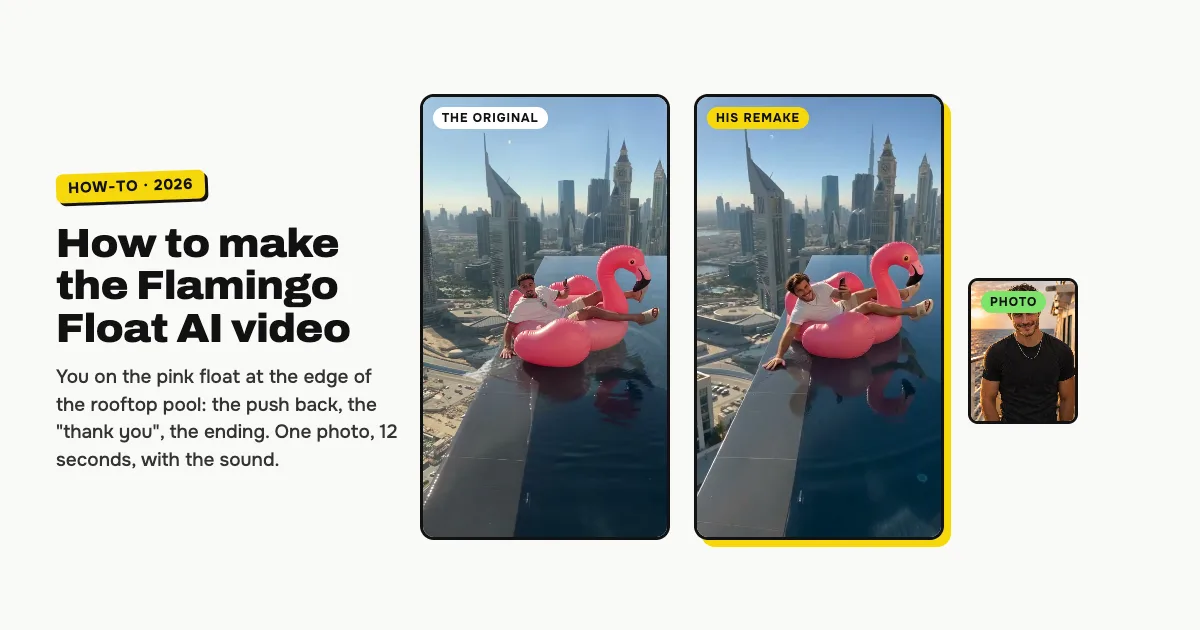
Short answer: to make the Flamingo Float AI video, open the Flamingo Float AI video generator on ClipRemake, add one clear photo of yourself and press Remake this. You lie on the giant pink flamingo float in the rooftop infinity pool, scrolling your phone while it drifts to the edge above the drop, push yourself back at the last second, point at the camera and say "thank you", then drift off until the float tips over the far edge. About five minutes later you download a 12-second, 9:16 MP4 with the reel's own sound and no watermark. One video costs $9.99, and there is no free version.
What is the flamingo float trend?
The flamingo float trend is one reel, copied everywhere: someone lies on a giant pink flamingo float in a rooftop infinity pool high above a city, calmly scrolling their phone, while the float drifts to the edge right above the drop. The friend filming shouts "hey, bro, bro, bro" and waves; at the last second the one on the float looks up, plants a hand on the edge, pushes back into the pool, points at the camera and says "thank you, thank you". Then the float drifts off and slips over the far edge anyway. People also search for it as the thank you bro trend, the hey bro trend or the infinity pool flamingo trend.
The creator Younes Zarou (@youneszarou) posted the reel on November 2, 2026, and it passed 28 million TikTok plays in five days. AI template sites added it from November 4. This template re-films his 12 seconds, beat for beat.
Who can be in it
One adult: you. You keep your own face and hair; the outfit is the white T-shirt, beige shorts and beige slides of the original reel, so your video looks like the one everyone has seen. It is made for people only.
How to make the Flamingo Float AI video, step by step
Step 1: Add your photo
Open the Flamingo Float AI page and tap the photo box (1). Choose a clear photo of yourself, face to the camera.
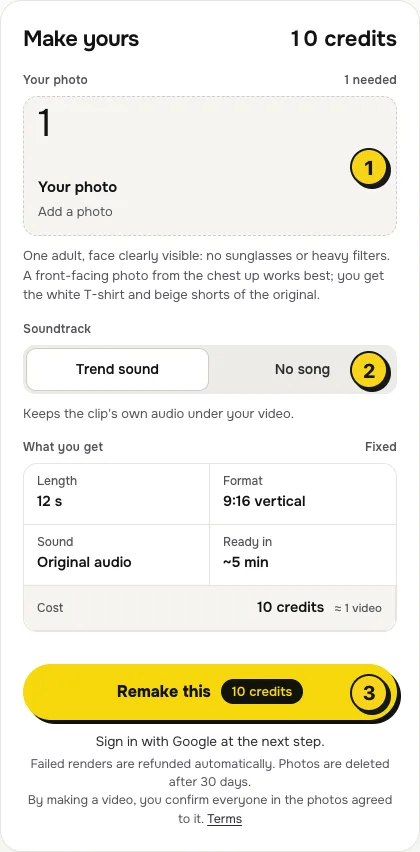
- One person per photo, face to the camera, no sunglasses or heavy filters.
- From the chest up works best. The float is a little away from the lens, so a sharp face is what makes it look like you.
- Any clothes are fine. Your video always has the white T-shirt and beige shorts of the original.
Step 2: Choose the sound
The switch (2) has two settings:
| Setting | What you get | When to pick it |
|---|---|---|
| Trend sound (default) | Your video with the reel's own 12 seconds of audio: the music, the "hey, bro, bro, bro" and the "thank you" | You want it ready to post, beat for beat with the original |
| No song | A silent video | You will add the sound inside TikTok or Reels, the safer way if an app mutes reused audio |
Step 3: Press Remake this
Press Remake this (3). If you are not signed in, you sign in with Google first. If you have no credits yet, you pick a pack: one video is $9.99, and bigger packs and plans cost less per video. Pay by card, Apple Pay or Google Pay. If a render fails, the credits come back on their own.
Step 4: Download and post
About five minutes later the video is in My videos. Download the MP4: it is 12 seconds, vertical 9:16, with no watermark. Switch on the AI-generated label when you post.
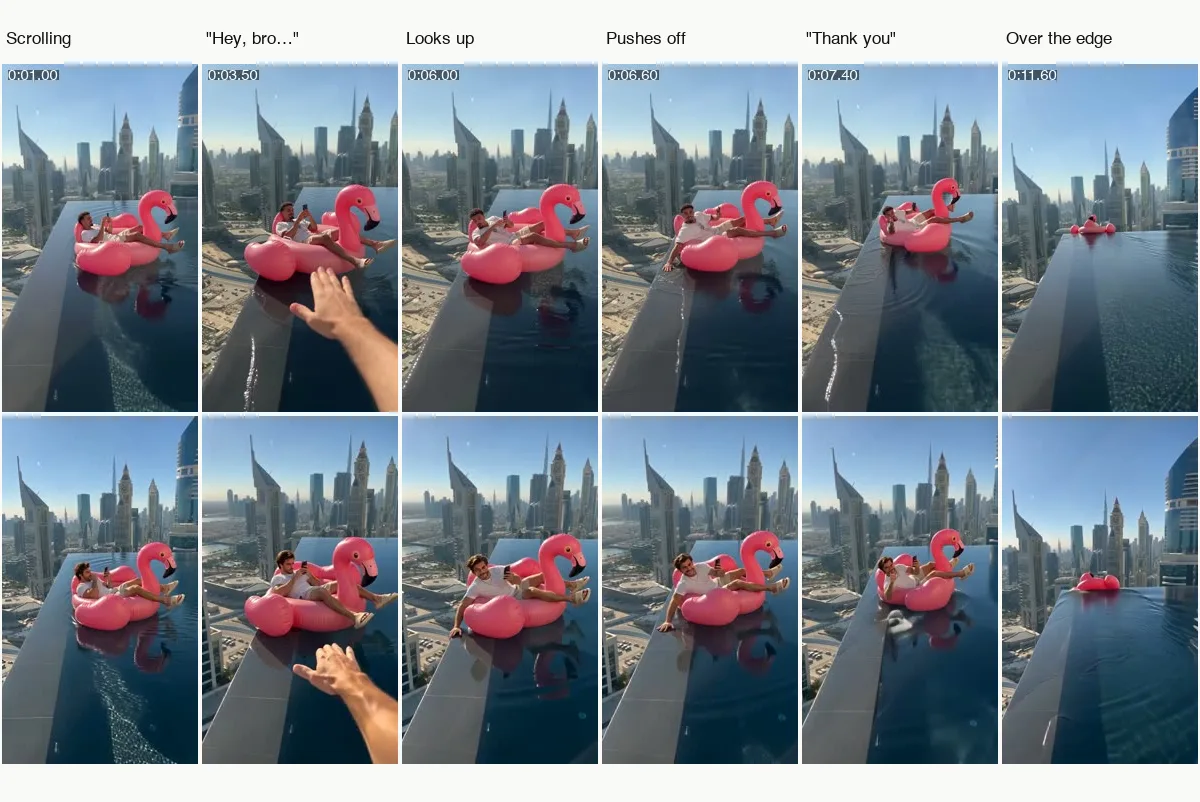
What your video looks like, beat by beat
The pool, the float, the handheld camera and every beat come from the original reel. Only the person changes:
| Time | What happens |
|---|---|
| 0:00–0:02.4 | You lie back on the float scrolling your phone, a fist to your chin for a moment |
| 0:02.4–0:04.8 | The friend filming shouts "hey, bro, bro, bro" and waves a hand into the frame; you don't notice |
| 0:04.8–0:06 | The float reaches the stone edge above the drop; you only look up at the very end |
| 0:06–0:07 | You plant your hand on the edge and push yourself back into the pool, with a grin |
| 0:07–0:08 | You point at the camera: "thank you, thank you" |
| 0:08–0:11.2 | Back to your phone while the float drifts across the pool |
| 0:11.2–0:12 | The float slips over the far edge |
Small moments can differ between renders: a glance at the camera can come a second early, or the splash can be bigger.
The sound, and how to change it on TikTok or Reels
With Trend sound on, your video carries the reel's own 12 seconds of audio, so it is ready to post. The music is an instrumental of "Under the Sea", and the voices are the friend's "hey, bro, bro, bro" and the "thank you". To use the sound from the app's library instead (it links your post to the trend), make it with No song, then add the sound in TikTok with Add sound, or in Reels with Audio.
Tips for a better result
- A sharp face. Well lit and front-facing: you are a few metres from the camera, so a blurry photo shows.
- Daylight. Photos taken outside or by a window blend best with the bright morning sun over the pool.
- One person per photo. A second face in the frame confuses who goes on the float.
Is it free?
No. Every video is a real render that costs money to make, so there is no free version, free trial or watermarked preview. One video costs $9.99, the pricing page lists packs and plans that cost less per video, and failed renders are refunded in credits automatically. Unused packs bought by mistake can be refunded under the refund policy.