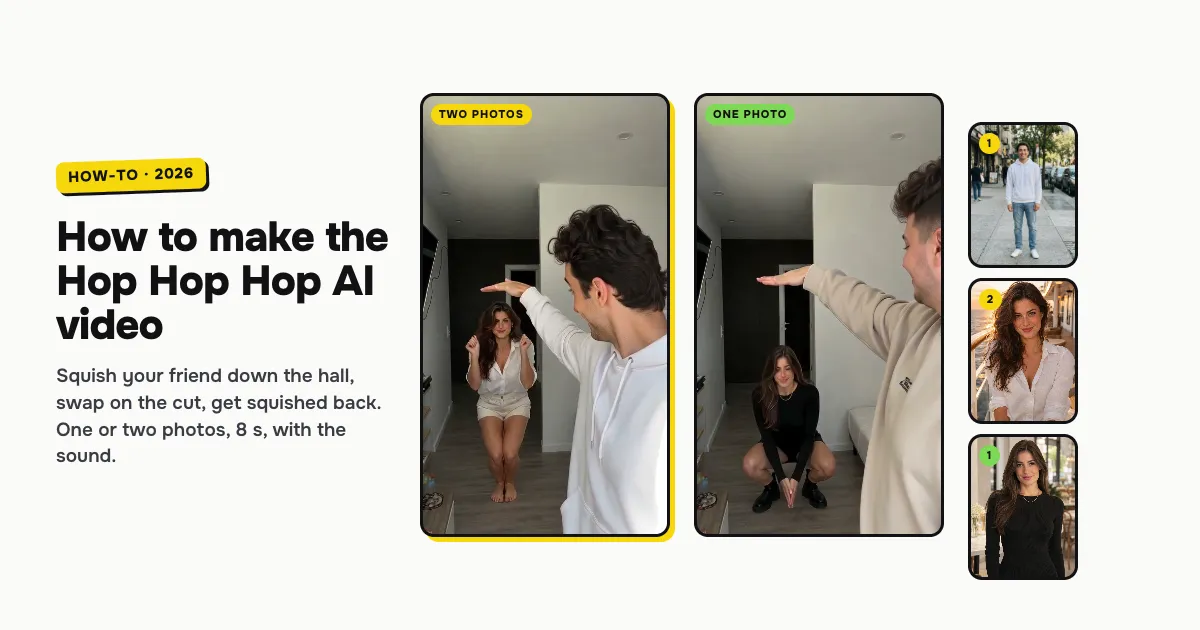
Short answer: to make the Hop Hop Hop AI video, open the Hop Hop Hop AI template on ClipRemake, add a clear photo of yourself (and one of your friend, if you like) and press Remake this. You stand at the camera in a white hallway and point at your friend far down the hall, who hops on the beat; you hold a flat hand over their head and squish them down, a hard cut swaps you, and your friend squishes you back. Without a second photo the AI makes up the friend. About five minutes later you download an 8-second, 9:16 MP4 with the clip's own sound and no watermark. One video costs $9.99 with one or two photos, and there is no free version.
What is the hop hop hop trend?
The hop hop hop trend is a TikTok duo gag to a sped-up clip of "Её парень" ("Her Boyfriend") by the Russian artist Shluzov. One person stands right at the camera and points down the hall at a friend, who hops on the beat far behind. Then the one in front holds a flat hand over the friend's head and squishes them down, a hard cut swaps the two, and the friend squishes back. People also call it squished or get squashed and search for it as the hop hop hop dance or the hop hop hop Russian song.
It took off in mid-October 2026 with cosplay and alt creators filming it with their best friend. On October 24 the artists @nirami1 and Cole posted the hallway take this template copies, and on October 25 an AI-made version with two folk-hero characters went viral, which is why so many people now make it with AI from their photos.
Who can be in it
Two adults: you and a friend, a sibling, a partner. Each of you keeps your own face, hair and clothes, both right at the camera and far down the hall. Only your photo is required: with one photo the AI makes up the friend, someone who looks like none of your photos. Our two examples below are made both ways. It is made for people only.
How to make the Hop Hop Hop AI video, step by step
Step 1: Add your photo
Open the Hop Hop Hop AI page. Tap box 1, You, at the camera first, and choose a clear, front-facing photo of yourself. You start at the camera and squish first; after the cut you are the one down the hall.
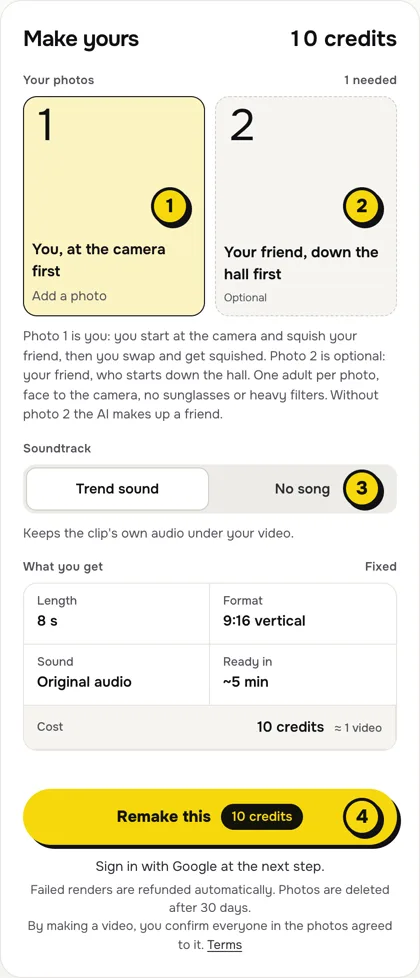
- One person per photo, face to the camera, no sunglasses or heavy filters.
- Head to toe helps. Far down the hall your whole body is in the shot, so a full-length photo shows the outfit you want; a waist-up photo works too.
- The face matters most. At the camera you fill half the frame, so a sharp, well-lit face is what makes it look like you.
Step 2: Add your friend (optional)
Box 2, Your friend, down the hall first, is the one who hops and gets squished first, then comes to the camera after the cut. Add a photo or leave it empty; the price is the same. Use only photos of adults who agreed to be in the video.
Step 3: Choose the sound
The switch (3) has two settings:
| Setting | What you get | When to pick it |
|---|---|---|
| Trend sound (default) | Your video with the clip's own 8 seconds of audio: the sped-up song the trend uses | You want it ready to post, beat for beat with the original |
| No song | A silent video | You will add the sound inside TikTok or Reels, the safer way if an app mutes reused audio |
Step 4: Press Remake this
Press Remake this (4). If you are not signed in, you sign in with Google first. If you have no credits yet, you pick a pack: one video is $9.99, and bigger packs and plans cost less per video. Pay by card, Apple Pay or Google Pay. If a render fails, the credits come back on their own.
Step 5: Download and post
About five minutes later the video is in My videos. Download the MP4: it is 8 seconds, vertical 9:16, with no watermark. Switch on the AI-generated label when you post, and tag your friend.
What your video looks like, beat by beat
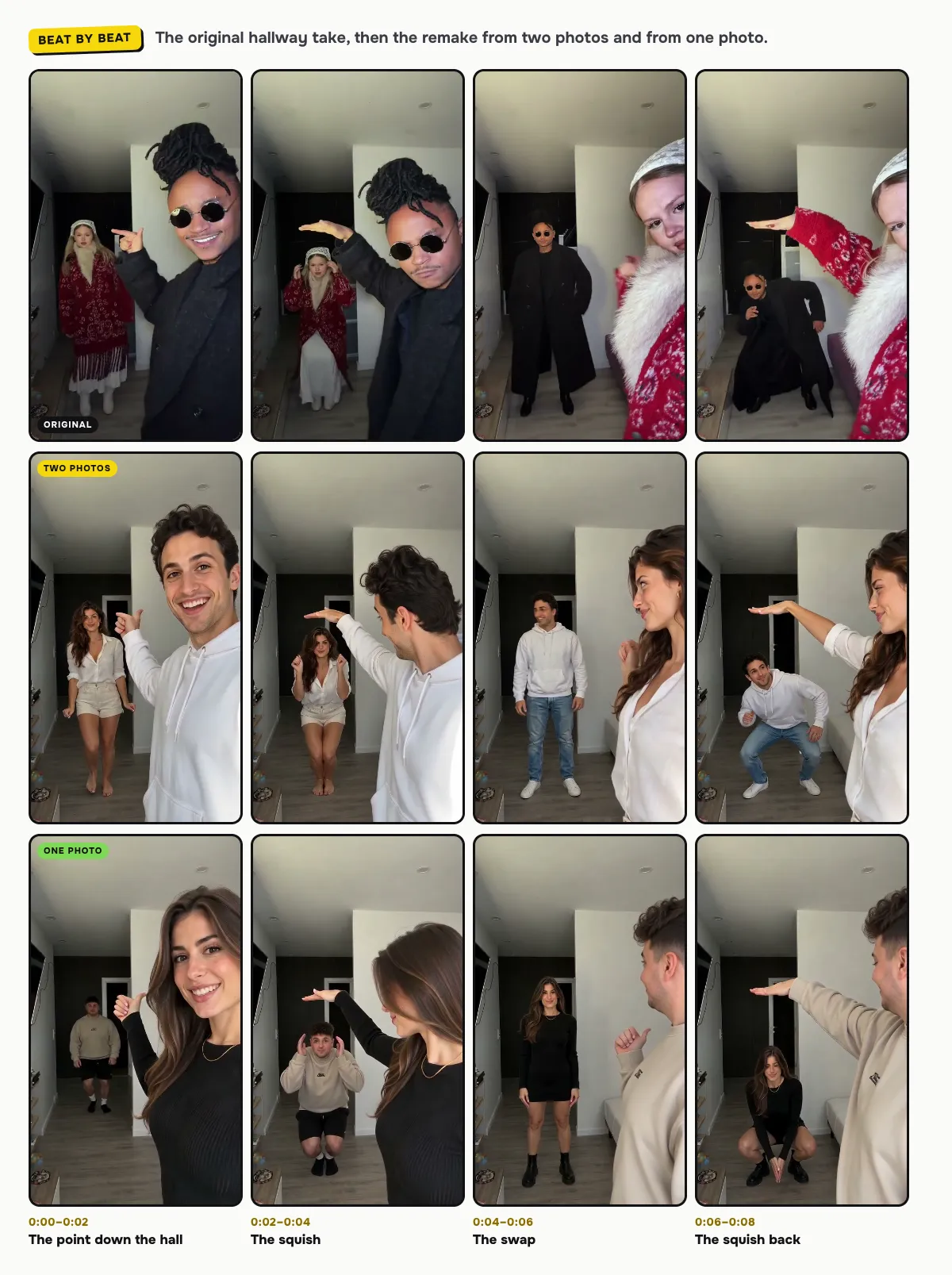
The hallway, the phone held still, the hard cut and every move come from the original take. Only the two people change:
| Time | Who is at the camera | What happens |
|---|---|---|
| 0:00–0:02 | You | You grin at the lens and point down the hall; your friend hops on the beat far behind |
| 0:02–0:04 | You | You hold a flat hand over your friend's head and they squat lower and lower, squished |
| 0:04 | — | Hard cut: you swap places |
| 0:04–0:06 | Your friend | Your friend is at the camera now, pointing back at you down the hall |
| 0:06–0:08 | Your friend | Your friend presses a flat arm over your head and you squat all the way down |
In both our examples each face stays on its own person, up close and far away. Small moments can differ between renders.
The sound, and how to change it on TikTok or Reels
With Trend sound on, your video carries the clip's own 8 seconds of audio, so it is ready to post. To use the hop hop hop sound from the app's library instead (it links your post to the trend), make it with No song, then add the sound in TikTok with Add sound, or in Reels with Audio.
Tips for a better result
- Two different looks. You keep your own hair and clothes, so the swap reads best when you and your friend look different.
- Even light. Photos in daylight or soft indoor light blend best with the bright hallway.
- One person per photo. A second face in the frame confuses who goes where.
Is it free?
No. Every video is a real render that costs money to make, so there is no free version, free trial or watermarked preview. One video costs $9.99 with one or two photos, the pricing page lists packs and plans that cost less per video, and failed renders are refunded in credits automatically. Unused packs bought by mistake can be refunded under the refund policy.