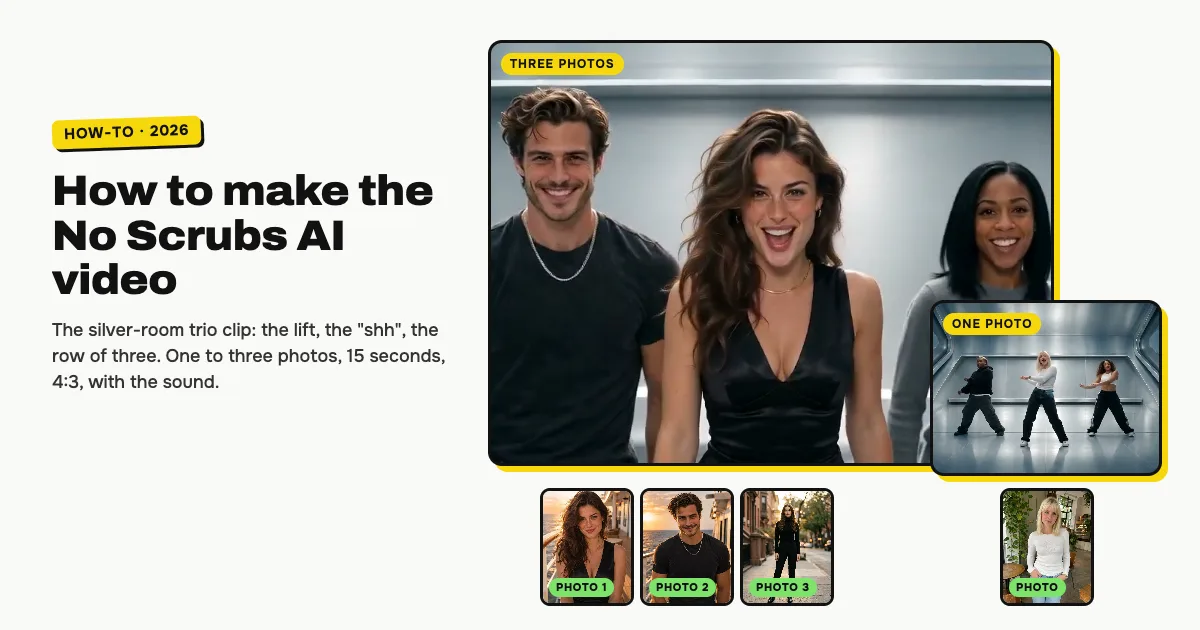
Short answer: open the No Scrubs AI template on ClipRemake, add a photo of the person who should lead, then up to two friends in boxes 2 and 3 (or none), and press Remake this. In about five minutes you download a 15-second MP4 in 4:3, the same boxy frame the TikTok posts use: the lead rises on a lift, the dancer on the left hushes the camera, the three of you dance in the silver room, and everyone wears what they wore in their photo. The trend sound is already on it. One video costs $9.99 however many photos you add, with no watermark and no free version.
What is the No Scrubs AI trend?
It is a TikTok AI format that drops ordinary people into a short recut of TLC's 1999 "No Scrubs" video, the one shot in a shiny silver set. @warped.ai posted the first one on October 16, 2026 with three guys in hoodies, and friend groups have copied the same cut since: lift, hush, sung close-up, a row of dancers, a shot from straight above, and three grinning faces at the end.
What makes it work is the contrast. The set is a glossy late-90s music video; the people in it look like they walked in off the street.
Who can be in it
One to three adults, each from their own photo:
| Photo | Place in the video | Their big moments |
|---|---|---|
| 1 (needed) | Lead, in the center | The lift, the sung close-up, the overhead shot |
| 2 (optional) | Left of the lead | The hush at the lens, a solo with a kick at the camera |
| 3 (optional) | Right of the lead | Every group shot and the closing faces |
Leave photo 2 or 3 empty and the AI fills that spot with a backup dancer who is nobody you know. It is made for people: no pets, cartoons or children.
How to make the No Scrubs AI video, step by step
Step 1: Add the lead
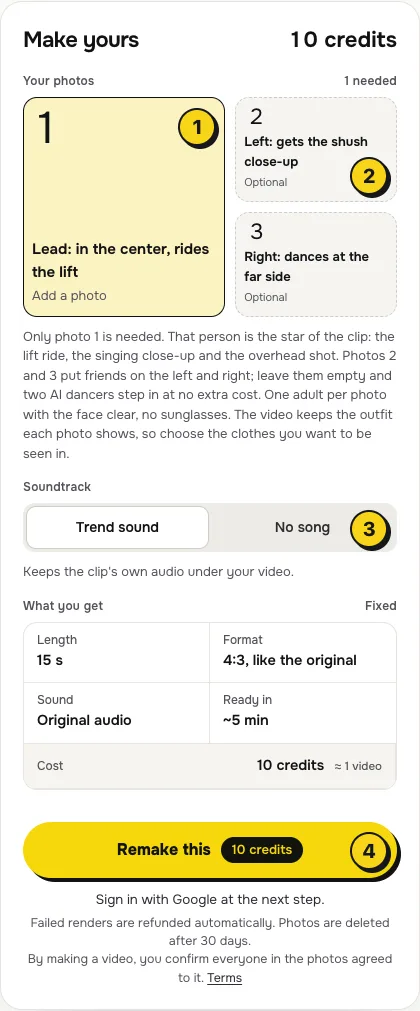
On the No Scrubs AI template, tap box 1. Pick the photo of whoever the video is about: the birthday, the group chat's main character, you.
Step 2: Add friends, or skip it
Boxes 2 and 3 are optional. Give box 2 to the friend who can pull off a straight-faced "shh", since that is their close-up. Box 3 suits someone who wants to be in it without a solo.
- Full body or knees up is ideal. The video copies each outfit from the photo, so a head-only selfie leaves the AI guessing the trousers and shoes.
- One person per photo, face clear, no sunglasses or heavy filters.
- Different outfits help. In the wide shots faces are small, so clothes and hair are how people tell you apart.
Step 3: Choose the sound
The switch (3) has two settings:
| Setting | What you get | When to pick it |
|---|---|---|
| Trend sound (default) | The 15 seconds of audio the posts use, laid under your video | You want to post it as it is |
| No song | A silent MP4 | You will add the sound in TikTok or Reels yourself |
Step 4: Press Remake this
Press Remake this (4). If you are not signed in, you sign in with Google first. With no credits yet, you choose a pack: one video is $9.99 (10 credits), and bigger packs and plans cost less per video. Pay by card, Apple Pay or Google Pay. If a render fails, the credits come back on their own.
Step 5: Download and post
About five minutes later the video is in My videos. Download the MP4 (15 seconds, 4:3, 480p, no watermark) and switch on the AI-generated label when you post.
What your video looks like, beat by beat
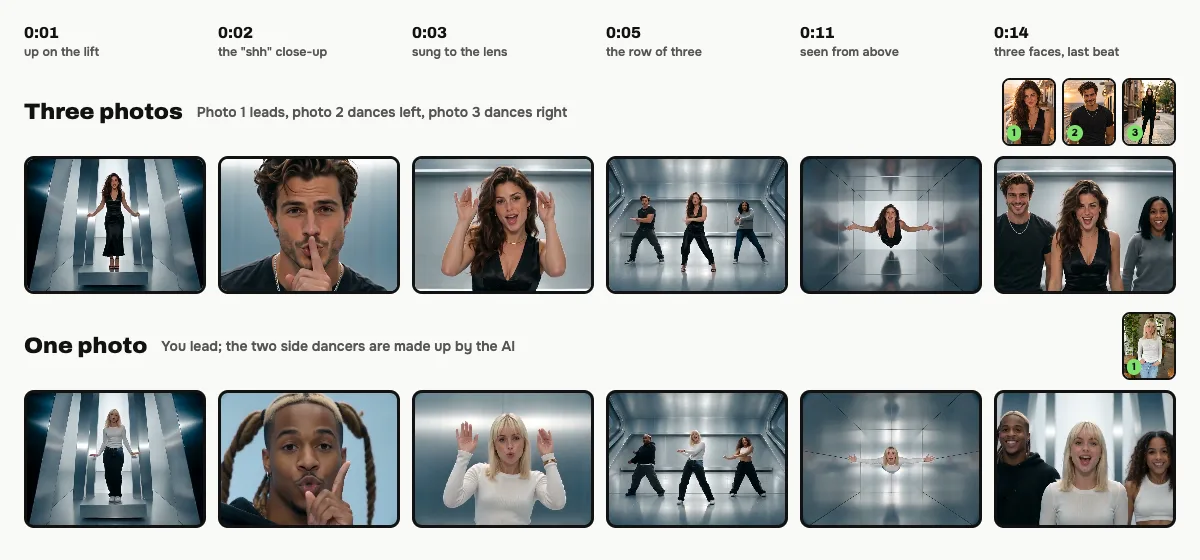
Here are both of our examples side by side, one made from three photos and one from a single photo:
| Time | What happens |
|---|---|
| 0:00–0:02 | The lead stands on a platform that rises through a silver hall |
| 0:02–0:03 | Photo 2 leans into the lens, finger to the lips |
| 0:03–0:04 | The lead sings at the camera, hands up by the face |
| 0:04–0:06 | Wide, then from the floor: all three dancing in a row |
| 0:06–0:08 | Photo 2 drops low, reaches out and kicks toward the lens |
| 0:08–0:10 | Arms overhead, then a side view of the row |
| 0:10–0:12 | The camera looks straight down at the lead, arms out wide |
| 0:12–0:13 | Low-angle side steps |
| 0:13–0:15 | Three faces close together, then the wide room to end |
Small moments can differ between renders.
Why it is 4:3, and posting it
The posts are 4:3 because the 1999 video was made for TV, so your file keeps that shape. TikTok, Reels and Shorts letterbox it top and bottom, just like the viral versions. Do not crop it to vertical: the dancers at the edges get cut off.
With Trend sound on, the audio is already in the file. If an app mutes reused audio, make the No song version and add the sound there with Add sound in TikTok or Audio in Reels.
Tips for a better result
- Light from the front. Faces in the close-ups come out sharper from well-lit photos.
- Show the clothes. A photo that shows the whole outfit gives you the whole outfit in the video.
- Lead with the main character. Photo 1 gets three solo shots, so put the person the video is for there.
Is it free?
No. Every video is a real render that costs money to make, so there is no free version, free trial or watermarked preview. One video costs $9.99 whatever the number of photos, the pricing page lists packs and plans that cost less per video, and failed renders are refunded in credits automatically. Unused packs bought by mistake can be refunded under the refund policy.