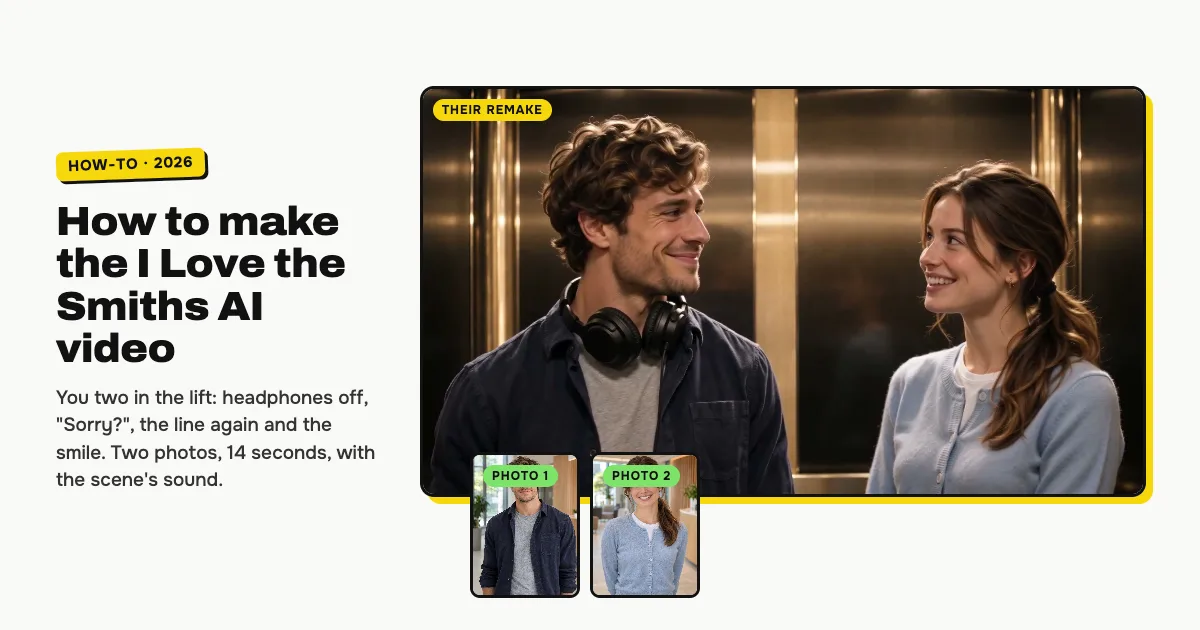
Short answer: to make the I Love the Smiths AI video, open the I Love the Smiths AI video generator on ClipRemake, add two clear photos, the one in the headphones first, and press Remake this. The two of you stand side by side in a dim lift: the one in big headphones pulls them off at "I love the Smiths", asks "Sorry?", hears the line again, then "You have good taste in music", a line of the song, and a long smile. About five minutes later you download a 14-second, 720p, 16:9 MP4 with the scene's own voices timed to your lips, and no watermark. One video costs $9.99, and there is no free version.
What is the I Love the Smiths trend?
"I love the Smiths" is the line from the elevator scene of (500) Days of Summer (2009). Tom stands in a lift with big headphones on, Summer hears the song leaking out and says "I love the Smiths", he pulls the headphones off, "Sorry?", and she says it again. People also search for it as the 500 Days of Summer elevator scene, the Tom and Summer elevator scene or just "i love the smiths".
The line has been a TikTok sound for years, with couples acting it out to the song. In early November 2026 an AI version took over: one locked-off two-shot of two people side by side in a dim lift, made with CapCut and Kling templates, and worldwide searches for "i love the smiths" jumped about eightfold from November 5. This template re-films that two-shot, beat for beat. No footage from the film is used, and no one from it appears in your video.
Who can be in it
Two adults: you and your partner, a friend or your crush. Each keeps their own face, hair and clothes from their photo. It is made for people only, and both photos are needed.
How to make the I Love the Smiths AI video, step by step
Step 1: Add the one in the headphones
Open the I Love the Smiths AI page and tap box 1. This person stands on the left in big headphones, pulls them off and says "Sorry?" and later "You like the Smiths?".
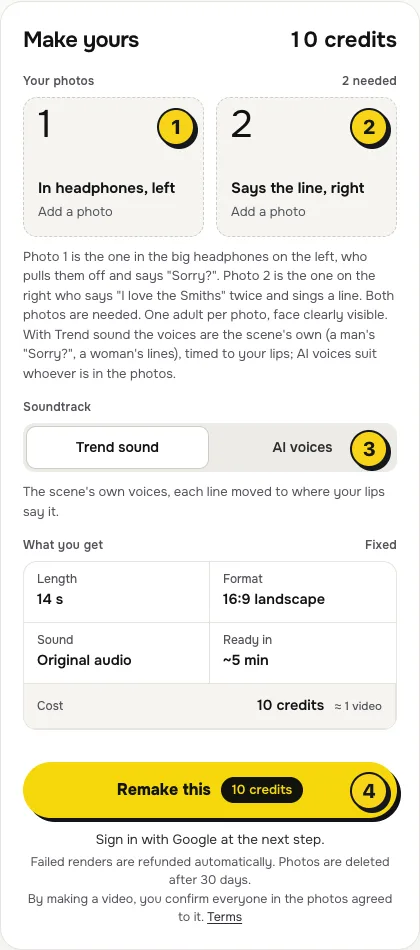
- One person per photo, face to the camera, no sunglasses or heavy filters.
- From the chest up works best: the two of you are side by side, so each face is about a third of the frame high.
Step 2: Add the one who says it
Tap box 2 and add the second photo. This person stands on the right, says "I love the Smiths" twice, adds "You have good taste in music" and sings a line of the song.
Step 3: Choose the sound
The switch (3) has two settings:
| Setting | What you get | When to pick it |
|---|---|---|
| Trend sound (default) | The scene's own voices, each line moved to where your lips say it: a man's "Sorry?" on the left, a woman's lines and the sung line on the right | You want the real lines, ready to post |
| AI voices | New AI voices that suit the two of you say the same lines, with no sound from the film | You swapped the parts, you are two men or two women, or you will turn the sound down and add one inside TikTok or Reels |
Step 4: Press Remake this
Press Remake this (4). If you are not signed in, you sign in with Google first. If you have no credits yet, you pick a pack: one video is $9.99, and bigger packs and plans cost less per video. Pay by card, Apple Pay or Google Pay. If a render fails, the credits come back on their own.
Step 5: Download and post
About five minutes later the video is in My videos. Download the MP4: it is 14 seconds, landscape 16:9, with no watermark. TikTok and Reels show it with bars above and below. Switch on the AI-generated label when you post.
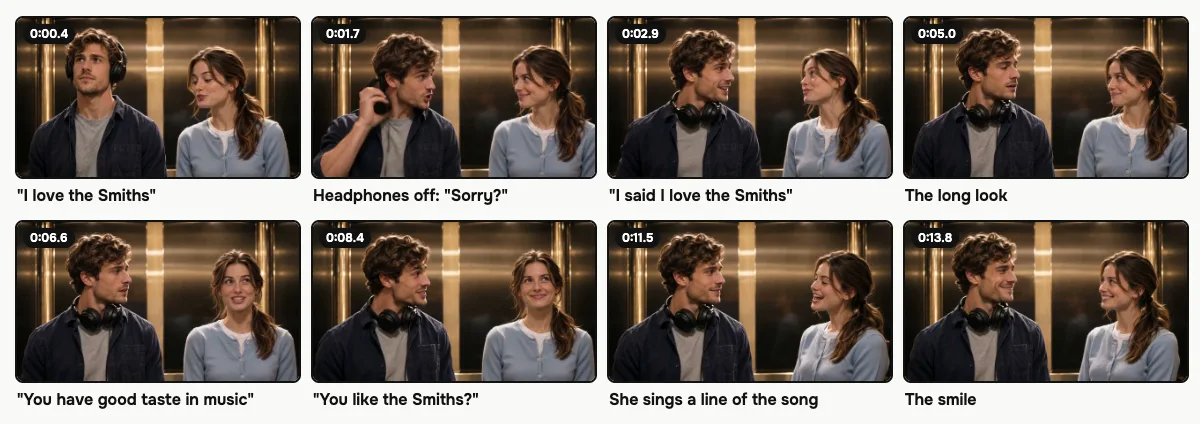
What your video looks like, beat by beat
The lift, the camera that never moves and every beat come from the AI clip the trend copies. Only the two people change:
| Time | What happens |
|---|---|
| 0:00–0:01.5 | Box 1 stares ahead in big headphones; box 2 glances over and says "I love the Smiths" |
| 0:01.5–0:02.3 | Box 1 pulls the headphones down to the neck and turns: "Sorry?" |
| 0:02.3–0:03.7 | Box 2: "I said I love the Smiths" |
| 0:03.7–0:06 | A long look; the song leaks from the headphones |
| 0:06–0:09 | "You have good taste in music." "You like the Smiths?" "Yeah." |
| 0:10.3–0:13.7 | Box 2 sings "To die by your side is such a heavenly way to die" |
| 0:13.7–0:14 | The two of you smile at each other |
The long look can run a second shorter or longer from one video to the next; every line follows the lips, wherever they say it.
The sound, and how to change it on TikTok or Reels
With Trend sound on, your video carries the scene's own lines, so it is ready to post. Each line is moved to the moment your lips say it, so no line plays over a closed mouth. The voices stay the scene's own whoever is in the photos: a man's "Sorry?" and "You like the Smiths?" on the left, a woman's lines on the right. The song in the headphones is "There Is a Light That Never Goes Out" by The Smiths.
With AI voices, new voices that suit the two of you say the same lines, with no sound from the film. To use a sound from the app's library, turn the original sound down in TikTok and add yours with Add sound, or use Audio in Reels.
Tips for a better result
- Two sharp faces. Well lit and front-facing: you are side by side in a medium shot, so a blurry photo shows.
- Similar light. Two photos taken in soft, even light blend best with the warm, dim lift.
- Mind the voices. With Trend sound on, box 1 gets the man's two short lines and box 2 the woman's lines, so put the photos in the order that suits you, or pick AI voices.
Weighing other I Love the Smiths AI makers too? Best I Love the Smiths AI video generators, compared puts them side by side: voices, lip sync, the two-shot.
Is it free?
No. Every video is a real render that costs money to make, so there is no free version, free trial or watermarked preview. One video costs $9.99, the pricing page lists packs and plans that cost less per video, and failed renders are refunded in credits automatically. Unused packs bought by mistake can be refunded under the refund policy.